Microsoft 365 and Office | Other
Miscellaneous topics that do not fit into specific categories.

This browser is no longer supported.
Upgrade to Microsoft Edge to take advantage of the latest features, security updates, and technical support.
' cx='32' cy='32' r='32' /%3E%3Ctext x='50%25' y='55%25' dominant-baseline='middle' text-anchor='middle' fill='%23FFF' %3ESC%3C/text%3E%3C/svg%3E)
When will the issue with Office Agent be resolved?
Miscellaneous topics that do not fit into specific categories.
AI answer
Microsoft has not published a resolution date for the current Office Agent behavior, so the actionable next step is to request an update and escalation on your existing support ticket rather than opening another case.
Office Agent remains a Frontier early-access preview that is still rolling out in select markets and languages. Preview functionality can change while Microsoft develops it, and the Office Agent FAQ does not announce a current widespread outage or restoration date.^1^ ^2^
Microsoft Learn Q&A is a public community forum and cannot access the ticket, arrange a callback, or contact you privately.
Ask a Microsoft 365 administrator to check:
Microsoft 365 admin center → Health → Service health
Open any relevant Copilot, Microsoft 365, or Office-on-the-web incident to see its status and Microsoft’s updates. If nothing matches, select Report an issue so Microsoft can correlate the tenant’s report with reports from other organizations.^4^
The administrator should also review Copilot → Settings → View all → Copilot Frontier and confirm that the affected account remains included in All users or Specific users and groups. Frontier access is controlled there, and configuration changes can take up to three hours to appear.^5^
Do not post the ticket number, account address, screenshots containing personal information, or tenant identifiers publicly.
References
I have attempted to run Office Agent Office Agent in an Edge InPrivate window to no avail.
' cx='32' cy='32' r='32' /%3E%3Ctext x='50%25' y='55%25' dominant-baseline='middle' text-anchor='middle' fill='%23FFF' %3EVT%3C/text%3E%3C/svg%3E)
Hi Steve Chavez,
Thank you for confirming that you are using a personal Microsoft account with Microsoft 365 Family, Edge, and Windows 11.
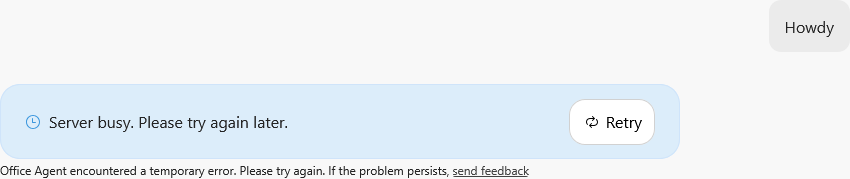
Since the “Server busy. Please try again later” message has affected every Office Agent task for three days, please test it once in an Edge InPrivate window. If the same error continues, submit feedback from within Office Agent with diagnostic data included, then contact Microsoft Support and provide the error message, approximate timestamps, and the troubleshooting already attempted.
The message alone does not confirm whether the problem is permanent, region-related, or affecting all users. Please also note that submitting product feedback does not normally create an individual support case or provide confirmation that a specific report has been reviewed.
This is a user-to-user support forum. Community moderators and contributors, including external Microsoft staff, cannot access Office Agent’s back-end systems, verify an individual feedback report, or confirm Microsoft’s internal repair timeline. Microsoft Support will need to investigate this persistent service error further.
I understand this is not the definite resolution date you were hoping for, but I do not want to incorrectly classify the issue without verified service information.
Hi Steve Chavez,
I understand how disruptive it can be when Office Agent is not working as expected. However, the description does not yet identify the specific behavior you are experiencing, so it is not possible to determine whether this is a known issue or provide an estimated resolution time.
Office Agent is still a preview feature being rolled out gradually through Frontier for eligible Microsoft 365 plans, markets, and languages. During a preview rollout, availability and behavior may change, and Microsoft has not provided one general resolution date that would apply to every Office Agent issue.
Could you clarify:
If possible, include a screenshot with any email address, case number, tenant information, or other personal details removed.
Please note that this is a user-to-user support forum. Community moderators and contributors, including external Microsoft staff, cannot access Office Agent’s back-end systems, investigate an individual account, or confirm Microsoft’s internal repair schedule. My role here is to help narrow down the issue, suggest relevant troubleshooting steps, and direct you to the appropriate support channel when necessary.
I realize this may not provide the timeline you were hoping for, but the details above will help determine whether the problem is related to the preview rollout, the account, or a specific Office Agent function. Thank you so much for your understanding.
Note: Please follow the steps in our documentation to enable e-mail notifications if you want to receive the related email notification for this thread.
' cx='32' cy='32' r='32' /%3E%3Ctext x='50%25' y='55%25' dominant-baseline='middle' text-anchor='middle' fill='%23FFF' %3ESA%3C/text%3E%3C/svg%3E)
Hi. I also am having problems with Office Agent. Maybe it is the same issue as OP.
Since Sunday, I am getting this error message from Office Agent:
To respond to your questions on a bulleted list:
Will it be fixed soon? Has it been shut down permanently?
I am outside the US: is it being restricted to US users?
Thank you
Hi Samuel Augusto Currea Cepeda,
Thank you for confirming that you are also receiving the “Server busy. Please try again later” error in Office Agent. I understand how frustrating it is when the issue continues for several days and prevents you from completing any tasks.
Please test Office Agent in an Edge InPrivate window. If the same error continues, submit feedback from within Office Agent with diagnostic data included, then contact Microsoft Support. Provide the exact error message, approximate timestamps, your Microsoft 365 subscription, browser and operating system, along with any troubleshooting you have already tried.
Please note that this is a user-to-user support forum. Community moderators and contributors, including external Microsoft staff, cannot access Office Agent’s back-end systems, verify individual feedback reports, or confirm Microsoft’s internal repair timeline. Microsoft Support will need to investigate this persistent service error further.
Thank you so much for your cooperation.