Cannot Activate Windows 11 after Mother Board upgrade

Jim M 20 Reputation points
2026-10-21T06:05:34.1566667+00:00

Replaced Mother Board in very old HP Pavilion Desktop so as to be compatible with Win 11. Used Rufus to run Win 11 on it which worked fine until a recent Windows update. Decided to replace mother board, now Win 11 will not activate. I still see my computer under Devices in my Microsoft account. I tried all the online troubleshoot, including "I changed hardware on this device recently" but no luck. I tried all the suggestions the AI gave me, still no luck. I still have the original Product Key. Of course, it is for Win Vista HmPrm - Win7 HmPrm printed on the fancy label. I tried it and still no luck. After that I bought a new Windows 11 Pro key online from my employer and receive the product code via email. I thought for sure that would work, although it should not have been necessary. I did not care anymore just want to move on. Imagine my surprise when it did not work. I tried calling Microsoft support but seems anything having to do with activation gets routed to automated tools. How do I get Win Activation to work?

Windows for home | Windows 11 | Licensing and activation

Answer accepted by question author
DaveM121 949.2K Reputation points Independent Advisor
2026-10-21T06:39:25.7666667+00:00

The previously free upgrade licence cannot be used after a motherboard change, that free upgrade licence dies with the old motherboard.

Download the free ShowKeyPlus app from the Microsoft Store.

1

Please provide a screenshot of that app window and please hide your product key in the screenshot.

2

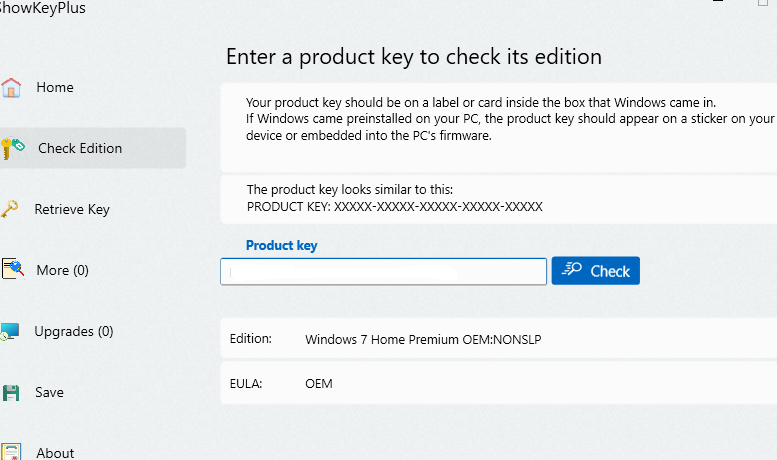
On the left of that app, click 'Check Edition', then enter your new Pro product key into that app.

Please provide a screenshot of that app window and please hide your product key in the screenshot.

Was this answer helpful?

2 people found this answer helpful.
0 comments No comments

3 additional answers

Sort by: Most helpful
  1. Deleted

    This answer has been deleted due to a violation of our Code of Conduct. The answer was manually reported or identified through automated detection before action was taken. Please refer to our Code of Conduct for more information.


    Comments have been turned off. Learn more

  2. Deleted

    This answer has been deleted due to a violation of our Code of Conduct. The answer was manually reported or identified through automated detection before action was taken. Please refer to our Code of Conduct for more information.


    Comments have been turned off. Learn more

  3. Jim M 20 Reputation points
    2026-10-21T16:16:46.6233333+00:00

    Thank you both Dave and Neil.
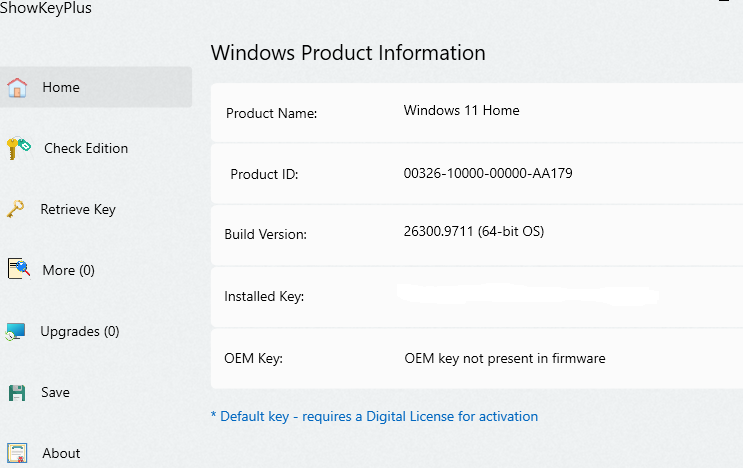
    Below is what ShowKeyPlus shows.
    First pic is current state of PC after installed new Mother Board
    Second pic is "Check Edition" Old Product key
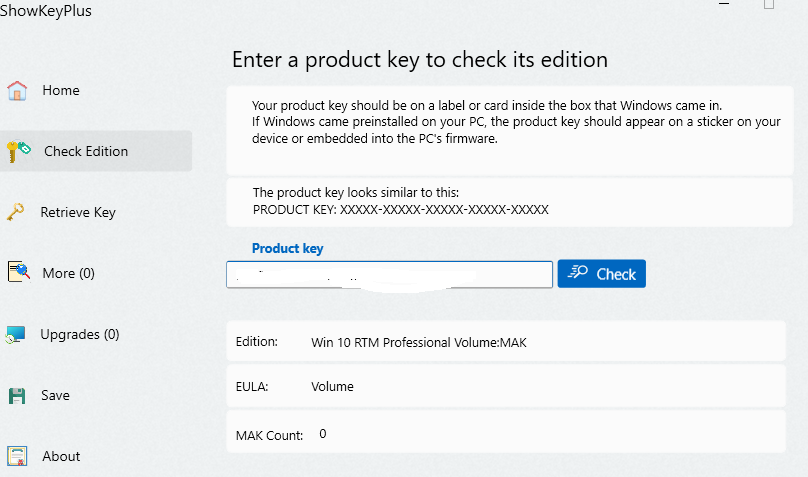
    Third pic is "Check Edition" New Product key for Windows 11 Pro purchased online from my Employer

    Also I did get an Installation ID and followed directions online at aka.ms/aoh but the message returned was sorry could not find a digital license to transfer.

    Neil, I never said I installed Windows 11 Pro. I installed Windows 11 from the Microsoft site online. Only after I could not get my old license to work I bought Windows 11 Pro license from my Employer online. I don't actually need Win 11 Pro but my Employer does not offer Win 11 Home. You can see from the image below when I enter in the Product key it says Win 10 RTM Professional Volume:MAK. Strange because it clearly says Win 11 Pro from the web site, so I don't know what is going on any more.

    I sure would like to get it working properly, any further help is greatly appreciate.
    User's image

    User's image

    User's image

    Was this answer helpful?


Your answer

Answers can be marked as 'Accepted' by the question author and 'Recommended' by moderators, which helps users know the answer solved the author's problem.