Hi @Owens, Audrey,
Thank you for posting your question in the Microsoft Q&A forum.
I completely understand how valuable the Schedule (calendar) view can be when visualizing work by due dates and how inconvenient it feels not to see this view after moving to Planner Premium.
At this time, the Schedule view is only available in Microsoft Planner Basic plans and is not supported in Planner Premium. As outlined in Microsoft’s official comparison table, both the Schedule view and the Outlook calendar view are listed as Basic‑only features. You can review this comparison here: Compare Microsoft Planner basic vs. premium plans.
That said, Planner Premium does offer a different, scheduling‑focused experience. Specifically, the Timeline (Gantt) view is available in Premium plans, along with several advanced capabilities such as dependencies, milestones, critical path analysis, and custom calendars. You can find an overview of these features here: Advanced capabilities with premium plans in Planner.If calendar‑style scheduling is essential to your current workflow, one possible workaround is to keep those specific plans as Basic plans so you can continue using the Schedule view. At the same time, you may choose to use Premium plans only when you need advanced project‑management features such as timelines, dependencies, milestones, or sprints.
In addition, Microsoft has indicated that ongoing updates aim to close feature gaps in the Premium experience. For this reason, I strongly encourage you to submit feedback directly from Planner by going to Help > Feedback, or through the Microsoft 365 Feedback Hub > Send Feedback, requesting Schedule view for Premium plans.
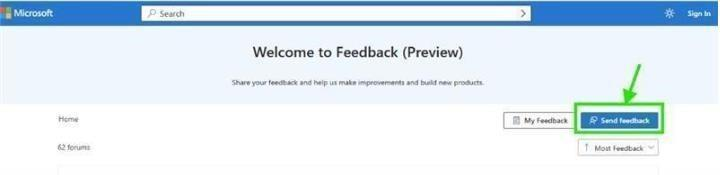
Once you've submitted your feedback, feel free to share the link here in the comments. I’ll be happy to upvote it to help bring more visibility.
As a community moderators, I kindly ask for your understanding that my access to internal development details is limited. My primary role is to guide users toward the appropriate resources and support channels. While I may not have influence product design decisions and have limited access to internal development details, I’ll continue doing our best to support you within the scope of my responsibilities.
Finally, since other users have raised similar concerns and may not yet know where to share their feedback, I hope this response not only clarifies the current behavior but also highlights a constructive next step. By sharing this information, it can become easier for others in the community to find guidance and contribute their feedback as well.
Thank you again for your time and for bringing up this important usability consideration. If you have any further questions or need additional assistance, please don’t hesitate to reach out.
Wishing you a great day.
If the answer is helpful, please click "Accept Answer" and kindly upvote it. If you have extra questions about this answer, please click "Comment".
Note: Please follow the steps in our documentation to enable e-mail notifications if you want to receive the related email notification for this thread.
' cx='32' cy='32' r='32' /%3E%3Ctext x='50%25' y='55%25' dominant-baseline='middle' text-anchor='middle' fill='%23FFF' %3EOA%3C/text%3E%3C/svg%3E)


' cx='32' cy='32' r='32' /%3E%3Ctext x='50%25' y='55%25' dominant-baseline='middle' text-anchor='middle' fill='%23FFF' %3EA%3C/text%3E%3C/svg%3E)
' cx='32' cy='32' r='32' /%3E%3Ctext x='50%25' y='55%25' dominant-baseline='middle' text-anchor='middle' fill='%23FFF' %3ELP%3C/text%3E%3C/svg%3E)