Microsoft Security | Microsoft Graph
An API that connects multiple Microsoft services, enabling data access and automation across platforms

This browser is no longer supported.
Upgrade to Microsoft Edge to take advantage of the latest features, security updates, and technical support.
' cx='32' cy='32' r='32' /%3E%3Ctext x='50%25' y='55%25' dominant-baseline='middle' text-anchor='middle' fill='%23FFF' %3EVB%3C/text%3E%3C/svg%3E)
Please help us below issue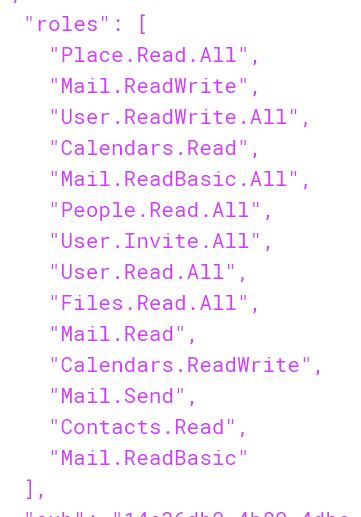 .
API : GET /users/{id | userPrincipalName}/events
Error : {'error':{'code':'NoPermissionsInAccessToken','message':'The token contains no permissions, or permissions can not be understood.','innerError':{'oAuthEventOperationId':'35d0f7c4-47ca-49eb-b421-b07f1ef8447a','oAuthEventcV':'dx/Z36Qu5kCH0Ws+YAKl1w.1.1','errorUrl':'https://aka.ms/autherrors#error-InvalidGrant','requestId':'f591d2eb-c891-48ef-8eae-d80966a641a1','date':'2021-05-20T05:43:42'}}}
Observation: Using OAuth connectivity salesforce to Microsoft graph API we establish connectivity and few APIs working, but calendar API we facing the above error message.
Token roles:
"roles": [
"Place.Read.All",
"Mail.ReadWrite",
"User.ReadWrite.All",
"Calendars.Read",
"Mail.ReadBasic.All",
"People.Read.All",
"User.Invite.All",
"User.Read.All",
"Files.Read.All",
"Mail.Read",
"Calendars.ReadWrite",
"Mail.Send",
"Contacts.Read",
"Mail.ReadBasic"
],
An API that connects multiple Microsoft services, enabling data access and automation across platforms
' cx='32' cy='32' r='32' /%3E%3Ctext x='50%25' y='55%25' dominant-baseline='middle' text-anchor='middle' fill='%23FFF' %3EDO%3C/text%3E%3C/svg%3E)
How have you obtained the access token? If you used https://login.microsoftonline.com/{tenant-id}/oauth2/v2.0/token is the user in the same tenant?
Yes, the user is the same tenant. Any other possible issue.
{"error":{"code":"NoPermissionsInAccessToken","message":"The token contains no permissions, or permissions can not be understood.","innerError":{"oAuthEventOperationId":"db6309f5-0cbe-488b-8ab1-c50cf41e06ed","oAuthEventcV":"3KPbLlLuPk66QZv9dzgJHw.1.1","errorUrl":"https://aka.ms/autherrors#error-InvalidGrant","requestId":"f85016c4-ff4a-40ea-bdc1-e33b2c2879a
This error is commonly associated with access token and how it was acquired. To find out what this error is associated with, you will have to provide more datils.
How you are acquiring the access token. Provide the details of oauth flow used and the token request call.
Then test out if this issue only happens for one user or all users
--- All users
Also is the app registration multitenant or single tenant.
-- Accounts in any organizational directory (Any Azure AD directory - Multitenant) and personal Microsoft accounts (e.g. Skype, Xbox)
' cx='32' cy='32' r='32' /%3E%3Ctext x='50%25' y='55%25' dominant-baseline='middle' text-anchor='middle' fill='%23FFF' %3EPS%3C/text%3E%3C/svg%3E)
I am facing the same issue. But the user is from the other tenant.
If I am using this app for other client, How i can get the tenant ID for that client?
From what I see, The first screenshot you shared shows a token which has roles(application permissions) while the token request attached shows scp( delegated permissions). Since you are trying to call GET /users/{id | userPrincipalName}/events, I suppose you are trying to access Graph using Application permissions.
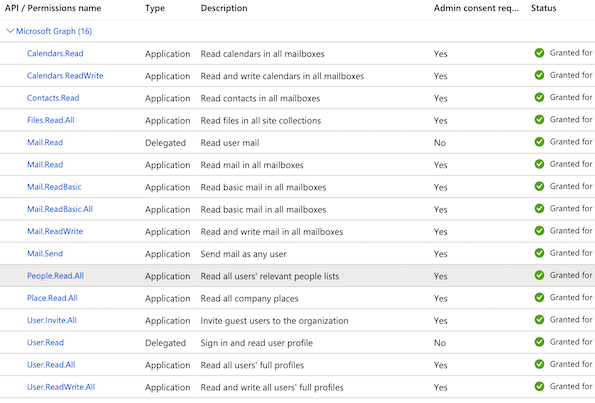
To get this to work I suggest you review between delegated permissions vs applications permissions auth code flow vs client credential flow which one works best for you and reconfigure. You are better off with application permissions using client credential flow. Here is a sample request of how to get the access token using this flow. Ensure the application has these permissions added and approved by admin.
curl --location --request GET 'https://login.microsoftonline.com/tenant-id/oauth2/v2.0/token' \
--header 'Content-Type: application/x-www-form-urlencoded' \
--data-urlencode 'grant_type=client_credentials' \
--data-urlencode 'client_id=your-client-id' \
--data-urlencode 'scope=https://graph.microsoft.com/.default' \
--data-urlencode 'client_secret=client-secret'
Note that I am not calling https://login.microsoftonline.com/common/oauth2/v2.0/token which also commonly causes this issue.
On the other hand if you are trying to get access token using auth code flow like you share using
https://login.microsoftonline.com/a1cd3436-6062-4169-a1bd-79efdcfd8a5e/oauth2/v2.0/authorize?
response_type=code
&client_id=403a1dca-c4f5-4296-99da-25d7094096df
&redirect_uri=https%3A%2F%2Fkaseya--crmitdev.my.salesforce.com%2Fservices%2Fauthcallback%2FMaxNetOutlook
&scope=User.Read+User.Read.All+User.ReadWrite.All+User.Invite.All+Calendars.Read+Calendars.ReadWrite+openid+email+profile+offline_access+Calendars.Read.Shared+Calendars.ReadWrite.Shared+Place.Read.All
&state=CAAAAXmin1VNMDAwMDAwMDAwMDAwMDAwAAAA5jd50IUCTDJcEWVXWtwKRbfVSbh
&sso_reload=true
Note that you can not use the token from above to call GET /users/{id | userPrincipalName}/events when the id | userPrincipalName is not the user who consented.
That said, I think you have the scopes and flows mixed up and would be better using client credential flow as suggested above if you don't need use consent. If you need user consent you will only call the API for resources for the user that has consented.
Incase you need more help, feel free to comment on this answer and if this answer is helpful, consider accepting and upvoting to get better help other users.