System Center Orchestrator
A family of System Center products that provide an automation platform for orchestrating and integrating both Microsoft and non-Microsoft IT tools.
This browser is no longer supported.
Upgrade to Microsoft Edge to take advantage of the latest features, security updates, and technical support.
' cx='32' cy='32' r='32' /%3E%3Ctext x='50%25' y='55%25' dominant-baseline='middle' text-anchor='middle' fill='%23FFF' %3EJR%3C/text%3E%3C/svg%3E)
Hi Team,
I have the “Run .Net Script” activity in one of the Runbooks, Which actually runs a PowerShell commands to send the incident information to ServiceNow using REST web services. I need to pass the credentials for authentication purpose while making the web service call. The same shell script when I run independently, it is working fine as I supply the credentials during the runtime.
I need some information on “How to pass a runtime parameters to the Runbook”, which is a sensitive information in our case. Please share the information if anyone knows how to pass the runtime parameters.
Sample code:
$CRED=get-credential
$ResponseObject=Invoke-RESTMethod -Uri $URL method 'POST' -credential $CRED -body $JsonBody -ContentType 'application/json'
Error details:
While running the runbook, it is getting failed at $CRED statement with the error "Cannot process command because of one or more missing mandatory parameters: credential"
Regards,
Jansi
A family of System Center products that provide an automation platform for orchestrating and integrating both Microsoft and non-Microsoft IT tools.

Hi @jansi rani krishnan ,
it's possible to store sensitive data like passwords as an encrypted variable in Orchestrator.
I am using two variables for this, it's easier to maintain later (UserName and UserPassword)
Make sure to select the Encrypted Variable checkbox for the UserPassword.

In your PowerShell script replace $CRED=get-credential with these lines.
$UserName = "UserName"
$PassWord = ConvertTo-SecureString -String "UserPassword" -AsPlainText -Force
$CRED = New-Object -TypeName System.Management.Automation.PSCredential -ArgumentList $UserName, $PassWord
In your PowerShell script you could subscribe to the variables (replace the hardcoded values) .
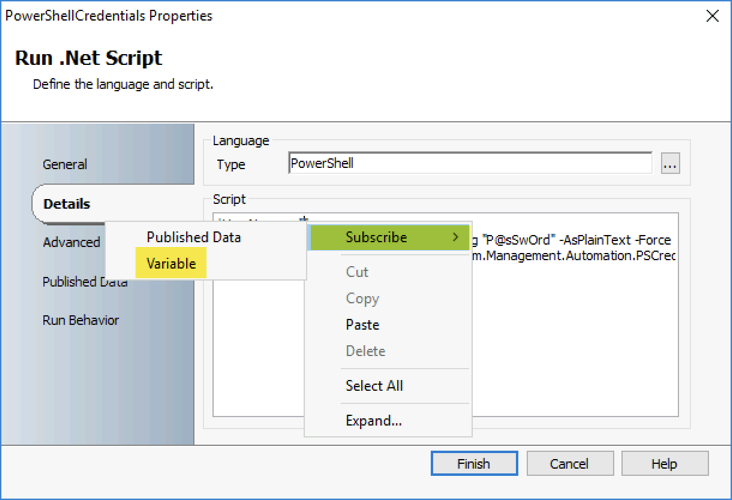
The result should look like this:

----------
(If the reply was helpful please don't forget to upvote and/or accept as answer, thank you)
Regards
Andreas Baumgarten
Hi Andreas,
Excellent.. This is perfectly working. Thank you so much.
Regards,
Jansi
Hi Jansi,
you are welcome :-)
Thanks for the feedback.
Kind regards
Andreas Baumgarten