Developer technologies | VB
An object-oriented programming language developed by Microsoft that can be used in .NET.
This browser is no longer supported.
Upgrade to Microsoft Edge to take advantage of the latest features, security updates, and technical support.
' cx='32' cy='32' r='32' /%3E%3Ctext x='50%25' y='55%25' dominant-baseline='middle' text-anchor='middle' fill='%23FFF' %3EHU%3C/text%3E%3C/svg%3E)
I get "Login failed for User" error in visual basic connection to sql-server. This error occurs when I move my database from one PC to another.
I solve this problem by using same "PC-name" & "User-Name" of my old PC in new one.
How should I avoid this I mean I want to use different "PC-name" & "User-Name" on new system. Note that my Sql Login credentials are same in both New & Old PC still it won't let me login.
An object-oriented programming language developed by Microsoft that can be used in .NET.
Additional SQL Server features and topics not covered by specific categories
This answer has been deleted due to a violation of our Code of Conduct. The answer was manually reported or identified through automated detection before action was taken. Please refer to our Code of Conduct for more information.
1 deleted commentComments have been turned off. Learn more
This answer has been deleted due to a violation of our Code of Conduct. The answer was manually reported or identified through automated detection before action was taken. Please refer to our Code of Conduct for more information.
Comments have been turned off. Learn more

Hi @Habib ur Rehman ,
> I mean I want to use different "PC-name" & "User-Name" on new system. Note that my Sql Login credentials are same in both New & Old PC still it won't let me login.
Agree with Erland. In addition, please make sure that the user account used in connection string is created in SQL server logins under security folder in new PC .
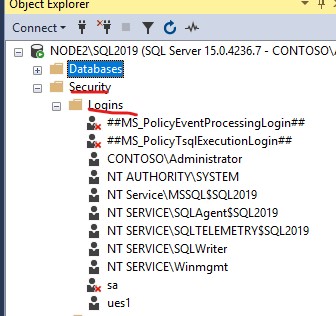
Please share us more detail error message for analysis.
If the answer is helpful, please click "Accept Answer" and kindly upvote it. If you have extra questions about this answer, please click "Comment".

How should I avoid this I mean I want to use different "PC-name" & "User-Name" on new system. Note that my Sql Login credentials are same in both New & Old PC still it won't let me login.
I'm not sure that I get this. First you say that you want to use different user-names, and then you say that your SQL login credentials are the same in both?
Are you using Windows authentication or SQL authentication? What does your connection string look like?
If you look in the SQL Server errorlog, you will find more details on why connection failed.