Do you know how to run a Powershell script?
Your problem is quite common and I've helped a number of users with similar problems. What I have tried to do is to bundle a few useful scripts the I have come across along with some that I have written myself into a single script to test your environment.
You didn't provide any error message that you encountered, so we'll need to run some tests to see where to go next.
You can save this script as any name that you want. I would suggest something like CheckMyNetwork.ps1.
You will need to launch Powershell with "Run as administrator" in order for it to work.
Start by running options 2, and 4 on the pc that hosts the file shares. Run options 1 and 2 on the "client" pc.
Option 1 should look like this if successful.
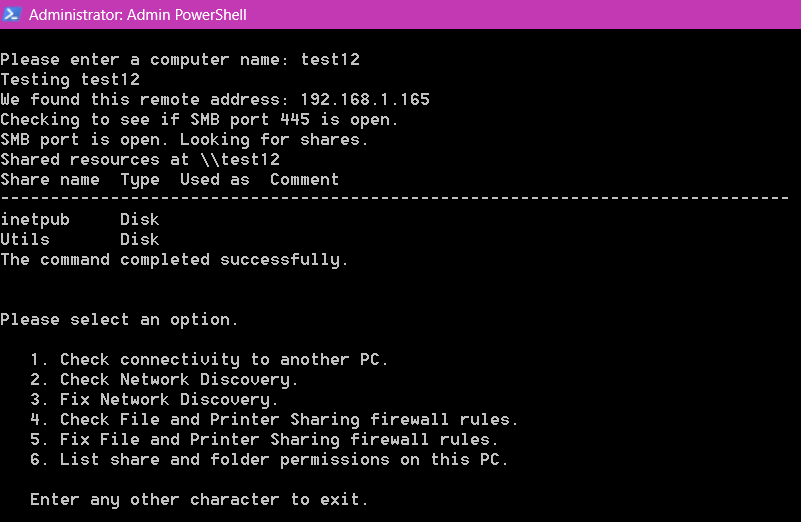
Please let us know what errors you get.
Here is the script.
<#
.NAME
CheckMyNetwork.ps1

.SYNOPSIS
This Powershell script tests and fixes issues with home network connectiviy.
That includes Network Discovery and File Sharing.

.DESCRIPTION
This script is intended for private networks where users are unable to connect to shares on their other PC's.

.NOTES
Author: Dave K. aka MotoX80 on the MS Technet forums.
Usage: Use this script at your own risk. I have made every effort to test it and verify functionality.
But I have no way to test for every possible configuration on every PC on the planet.
#>
function Test-IsAdmin {
	([Security.Principal.WindowsPrincipal] [Security.Principal.WindowsIdentity]::GetCurrent()).IsInRole([Security.Principal.WindowsBuiltInRole] "Administrator")
}
if ((Test-IsAdmin) -eq $False) {
   Write-Host "I am not running elevated."
   Write-Host "Please launch Powershell with 'run as administrator'"
   return
}
function Test-NetworkDiscovery {
	cls
    $np = Get-NetConnectionProfile
    "Your network profile is set to {0}." -f $np.NetworkCategory | Write-Host
    $ctr = 0
    $Svcs =  "DNS Client", "UPnP Device Host", "Function Discovery Resource Publication", "Function Discovery Provider Host", "SSDP Discovery"
    foreach ($sn in $Svcs) {
        $s = Get-Service $sn
        if ($s.Status -ne "Running") {
            "{0} is not running." -f $s.DisplayName | Write-Host
            $ctr++
        }
        if ($s.StartType -ne "Automatic") {
            "{0} is not set for automatic startup." -f $s.DisplayName | Write-Host
            $ctr++
        }
    }
    if ($np.NetworkCategory -ne "Private") {
        Write-Host "Your network profile is not set to Private."
        $ctr++
    }
    $fwr = Get-NetFirewallRule -DisplayGroup 'Network Discovery'  | where-object -property Profile -match "private" | select Name,DisplayName,Enabled,Profile
	 "I found {0} firewall rules." -f $fwr.count | Write-Host
    if ($fwr.count -lt 10 ) {
        Write-Host "Warning! There should be more rules than that. "
	}

    foreach ($f in $fwr) {
        if ($f.Enabled -ne "True") {
            "Rule {0} is not enabled.." -f $f.Name | Write-Host
            $ctr++
        }
    }
    if ($ctr -ne 0 ) {
        Write-Host "Errors were found!"
        Write-Host ""
        Write-Host "You should run the 'Fix' option."
    } else {
        Write-Host "No issues detected."
    }
}
Function Fix-NetworkDiscovery {

    #
    # FixNetworkDiscovery.ps1
    #
    # This script sets the following:
    # - Network profile is set to Private
    # - Start the required services and set to automatic startup.
    # - Enable firewall rules.
    #
    # Requires "run as administrator".
    #
    # Reference:
    #  http://winrollup.com/enable-network-discovery-in-windows-10-creator-edition-without-using-the-netsh-command-in-powershell
    #
	cls
    Get-Service  -name "UPnP Device Host" | Set-Service -StartupType Automatic
    Get-Service  -name "Function Discovery Resource Publication" | Set-Service -StartupType Automatic
    Get-Service  -name "Function Discovery Provider Host" | Set-Service -StartupType Automatic
    Get-Service  -name "SSDP Discovery" | Set-Service -StartupType Automatic


    Get-Service  -name "DNS Client" | Start-Service
    Get-Service  -name "UPnP Device Host" | Start-Service
    Get-Service  -name "Function Discovery Resource Publication" | Start-Service
    Get-Service  -name "Function Discovery Provider Host" | Start-Service
    Get-Service  -name "SSDP Discovery" | Start-Service

    Set-NetConnectionProfile -NetworkCategory Private -PassThru
    #Get-NetFirewallRule -DisplayGroup 'Network Discovery'|Set-NetFirewallRule -Profile 'Private, Domain' -Enabled true -PassThru|select Name,DisplayName,Enabled,Profile|ft -a

	Get-NetFirewallRule -DisplayGroup 'Network Discovery' | where-object -property Profile -match "private" | Set-NetFirewallRule  -Enabled true -PassThru|select Name,DisplayName,Enabled,Profile|ft -a

    Write-Host ""
    Write-Host "You may need to reboot if other PC's are unable to see this one."
}
Function Test-Connectivity {
    cls
    Write-Host ""
    $computer = Read-Host  "Please enter a computer name"
    Write-Host "Testing $computer"
    $GLOBAL:ProgressPreference = 'silentlyContinue'
    $tnc = Test-NetConnection -ComputerName $computer
    if ($tnc.remoteaddress -eq $null) {
        Write-Host "No network address was found."
        return
    }
    "We found this remote address: {0}" -f $tnc.remoteaddress | Write-Host
    Write-Host "Checking to see if SMB port 445 is open."
    $tnc = Test-NetConnection -ComputerName $computer -CommonTCPPort SMB
    if ($tnc.TcpTestSucceeded -eq $false) {
        Write-Host "SMB port is not accessible. Check the firewall rules."
        return
    }
    Write-Host "SMB port is open. Looking for shares."
    $stderr = ""
    $stdout = ""
    net.exe view \\$computer 2>&1 | ForEach-Object {
        if ($_ -is [System.Management.Automation.ErrorRecord]) {
            $stderr += $_.Exception.Message  # Extract error message text
        } else {
            if ($_.trim() -ne "") {
                $stdout += "$_`n" #.tostring()
            }
        }
    }
    if ($stderr -ne "") {
        $stderr | write-host -ForegroundColor Red
    }
    if ($stdout -ne "") {
        $stdout | write-host #-ForegroundColor White -BackgroundColor Green
    }
}
# Script: SharePermissionsSimple.ps1
Function SharePermissionsSimple {
	cls
	Get-SmbShare | Where-Object -Property Name -NotLike '*$' | Where-Object -Property Path -Like '*:\*' | foreach {        # exclude hidden and administrative shares
		write-host -ForegroundColor Blue "----------------------------------------------------------------"
		"             {0}"  -f $_.Name  | write-host -ForegroundColor Yellow
		write-host -ForegroundColor Blue "----------------------------------------------------------------"

		"Share permissions for {0}." -f $_.Name
		$_ | Get-SmbShareAccess | Format-Table -Property AccountName, @{L='Type';E={$_.AccessControlType}}, AccessRight
		""
		"NTFS folder permissions on {0}." -f $_.Path
		(Get-Acl -Path $_.Path ).Access | foreach {
			[pscustomobject] @{
				AccountName = $_.IdentityReference
				Type = $_.AccessControlType
				Inherit = $_.IsInherited
				AccessRight = ($_.FileSystemRights.tostring().replace(", Synchronize","").replace("-536805376","Modify (Inherit Only)"))
			}
		} | Format-Table   -AutoSize
	}
}
function Test-ShareRules {
	cls
    $np = Get-NetConnectionProfile
    "Your network profile is set to {0}." -f $np.NetworkCategory | Write-Host
    $ctr = 0
    if ($np.NetworkCategory -ne "Private") {
        Write-Host "Your network profile is not set to Private."
        $ctr++
    }
    $fwr = Get-NetFirewallRule -DisplayGroup 'File and Printer Sharing'  | where-object -property Profile -match "private"  | select Name,DisplayName,Enabled,Profile
	 "I found {0} firewall rules." -f $fwr.count | Write-Host
    if ($fwr.count -lt 10 ) {
        Write-Host "Warning! There should be more rules than that. "
	}
    foreach ($f in $fwr) {
        if ($f.Enabled -ne "True") {
            "Rule {0} is not enabled.." -f $f.Name | Write-Host
            $ctr++
        }
    }
    if ($ctr -ne 0 ) {
        Write-Host "Errors were found!"
        Write-Host ""
        Write-Host "You should run the 'Fix' option."
    } else {
        Write-Host "No issues detected."
    }
}
Function Fix-ShareRules {
	cls
    Set-NetConnectionProfile -NetworkCategory Private -PassThru
    Get-NetFirewallRule -DisplayGroup 'File and Printer Sharing' | where-object -property Profile -match "private" | Set-NetFirewallRule -Enabled true -PassThru | select Name,DisplayName,Enabled,Profile | ft -a
    Write-Host ""
}
# Peocedure Division
cls
while ($true) {
    Write-Host "Please select an option."
    Write-Host ""
    Write-Host "   1. Check connectivity to another PC."
    Write-Host "   2. Check Network Discovery."
    Write-Host "   3. Fix Network Discovery."
	Write-Host "   4. Check File and Printer Sharing firewall rules."
	Write-Host "   5. Fix File and Printer Sharing firewall rules."
	Write-Host "   6. List share and folder permissions on this PC."
	Write-Host ""
	Write-Host "   Enter any other character to exit."
    Write-Host ""
    $selection = Read-Host
    if ($selection -eq 1) {
        Test-Connectivity
    } elseif ($selection -eq 2) {
        Test-NetworkDiscovery
    } elseif ($selection -eq 3) {
        Fix-NetworkDiscovery
    } elseif ($selection -eq 4) {
		Test-ShareRules
    } elseif ($selection -eq 5) {
		Fix-ShareRules
    } elseif ($selection -eq 6) {
		SharePermissionsSimple
    } else {
        Write-Host "Done."
        return
    }
    ""
}
' cx='32' cy='32' r='32' /%3E%3Ctext x='50%25' y='55%25' dominant-baseline='middle' text-anchor='middle' fill='%23FFF' %3ECB%3C/text%3E%3C/svg%3E)


