Azure SQL Database
An Azure relational database service.
This browser is no longer supported.
Upgrade to Microsoft Edge to take advantage of the latest features, security updates, and technical support.
' cx='32' cy='32' r='32' /%3E%3Ctext x='50%25' y='55%25' dominant-baseline='middle' text-anchor='middle' fill='%23FFF' %3EAT%3C/text%3E%3C/svg%3E)
Hi,
I have a requirement where in I need to parameterize my Azure SQL/Azure Synapse linked service using 2 parameters 'DBServer' and 'DBName'. I configured my collaboration branch as below and everything works as expected in my Synapse workspace.
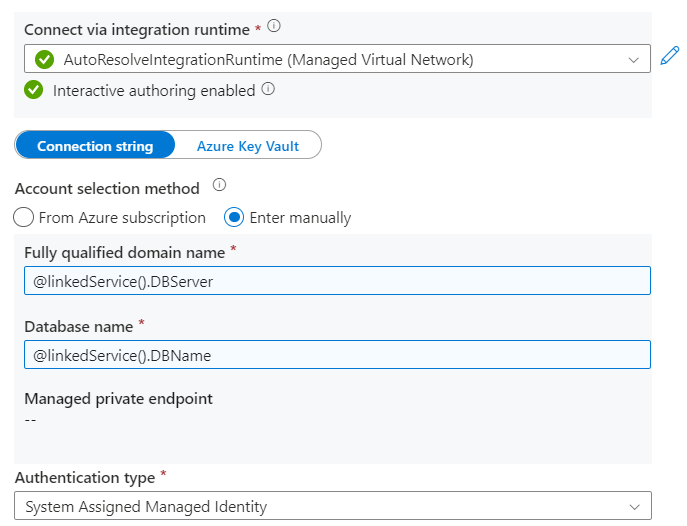
Even the linked service ARM template shows the connection string values as expected.

However when I publish the code (using the publish button in Synapse workspace), the code in the Synapse Live mode does not contain these parameters defined. Please see the snippet below.
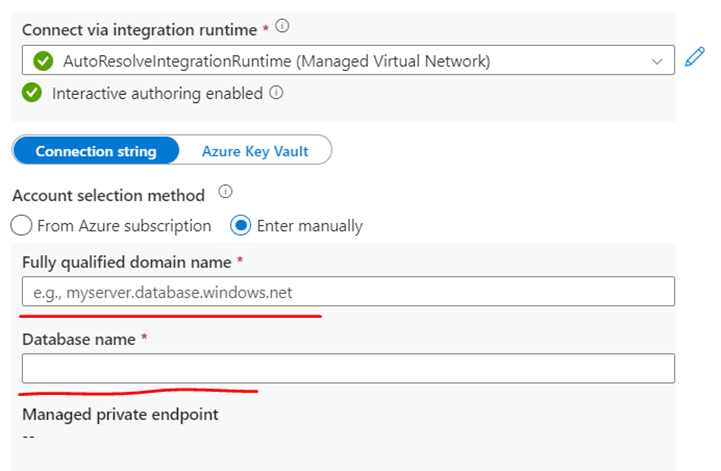
Even the code in the TemplateParameter file of the publish branch is blank.

I tried removing the parameters and put in the actual values for Server and DBName, it still shows no values in the publish branch/Live mode. While I understand that the git mode does not store secrets, this case of mine does not have any secrets and I am authenticating via Managed Identity.
Is there a solution to deal with this scenario? I would not prefer to store the connection string in KeyVault and refer it back in the linked service as it does not make the solution completely dynamic.
Thanks in advance,
Alok
An Azure relational database service.
An Azure analytics service that brings together data integration, enterprise data warehousing, and big data analytics. Previously known as Azure SQL Data Warehouse.
This answer has been deleted due to a violation of our Code of Conduct. The answer was manually reported or identified through automated detection before action was taken. Please refer to our Code of Conduct for more information.
6 deleted commentsComments have been turned off. Learn more