Azure Data Factory
An Azure service for ingesting, preparing, and transforming data at scale.
This browser is no longer supported.
Upgrade to Microsoft Edge to take advantage of the latest features, security updates, and technical support.
' cx='32' cy='32' r='32' /%3E%3Ctext x='50%25' y='55%25' dominant-baseline='middle' text-anchor='middle' fill='%23FFF' %3EDF%3C/text%3E%3C/svg%3E)
In the development Azure Data Factory (ADF) the linked sql connection's Authentication Type is set as System Assigned Managed Identity. As shown in the image bellow.

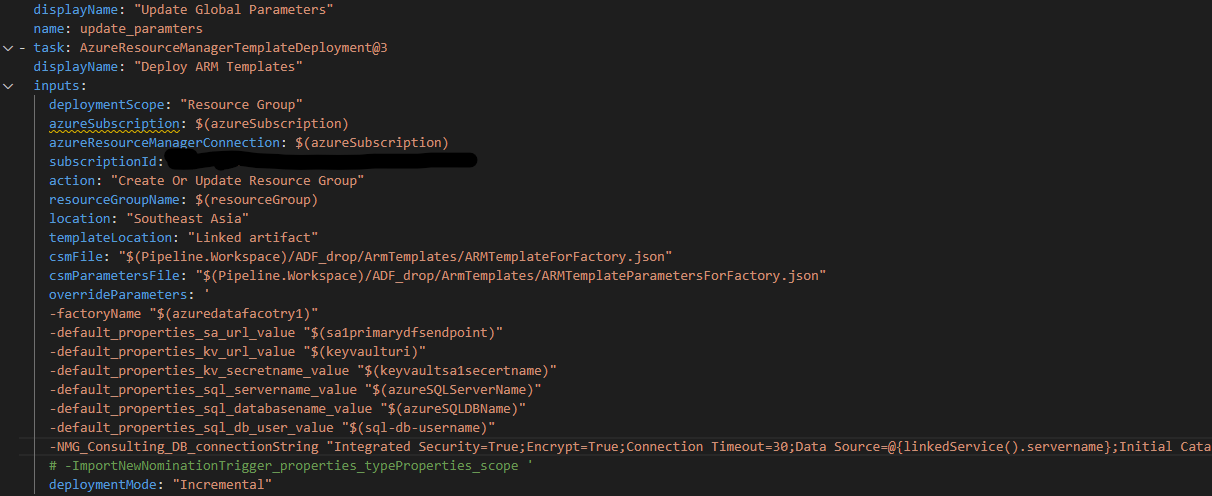
The ADF is connected to Azure Repo and when deployed via ARM template in CI/CD the same is created in the test ADF. Bellow is the Azure Pipeline power shell configuration for deployment.
But when click on the Linked Service in the Test ADF it sets Authenticaion Type as SQL Authentication. (It should be System Assigned Managed Identity)
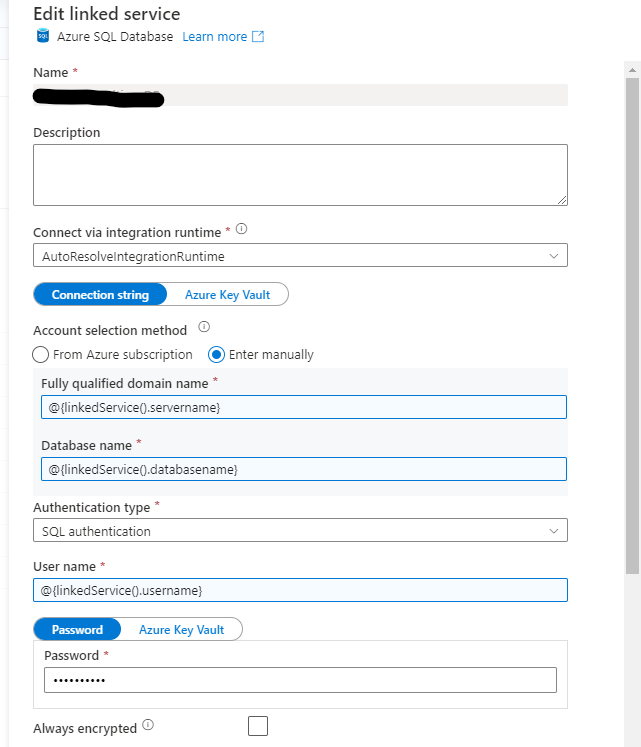
As a result of this, the linked service connection in Test environment is unable to use System Assigned Managed Identity. I to understand what is causing this issue?
An Azure service for ingesting, preparing, and transforming data at scale.
' cx='32' cy='32' r='32' /%3E%3Ctext x='50%25' y='55%25' dominant-baseline='middle' text-anchor='middle' fill='%23FFF' %3EBM%3C/text%3E%3C/svg%3E)
Hello DesmondFernando-2064,
Thanks for the question and using MS Q&A platform.
I tried to reproduce the issue from my end, but my release pipeline is able to create the SQL-linked service connection with managed identity.
Did you use SQL auth before? It could be your adf_publish branch might not have a recent commit. Could you create a new pull request to the adf_publish and rerun the pipeline and see if it fixes the issue?
Please let me know if you have any further questions.
Thanks for the prompt reply. I am deploying to a completely different ADF resource which is not connected to a repository. This deployment is done via ARM deployment via Azure pipeline. I have attached the screen shot of the task which dies the deployment.
In that, I have overwritten the connection string as per the recommendations. So there is no way that add_publish to the newly deployed ADF resource. When ever I make changes to the global parameter or override the values to ADF in the ARM template it is correctly reflected.
However, linked service connection for SQL does not apply system Assigned Managed Identity instead it assignes SQL Authentication as shown in the image.
' cx='32' cy='32' r='32' /%3E%3Ctext x='50%25' y='55%25' dominant-baseline='middle' text-anchor='middle' fill='%23FFF' %3EMW%3C/text%3E%3C/svg%3E)
If anybody else is having this problem in 2023 in Synapse, check if your connectionString value is a | instead of anything else.
This worked for me:
"typeProperties": {
                    "connectionString": "|",
                    "baseUrl": "=",
                    "serviceEndpoint": "="
                },
This answer has been deleted due to a violation of our Code of Conduct. The answer was manually reported or identified through automated detection before action was taken. Please refer to our Code of Conduct for more information.
6 deleted commentsComments have been turned off. Learn more