Looking for simple solution for survey embedded or built into ppt

Todd Morgan 0 Reputation points
2026-11-13T19:58:49.0566667+00:00

Have a kiosk deck where want to add a survey of several yes/no and multiple choice slides where results are for client eyes only... MS Forms is not an option as it is horrible. Any thoughts?

Microsoft 365 and Office | PowerPoint | For business | Windows
0 comments No comments

2 answers

Sort by: Oldest
  1. AI answer

    2026-11-13T19:59:40.76+00:00

    For a Windows kiosk that must retain responses without Microsoft Forms, use PowerPoint ActiveX choice buttons backed by VBA and save the deck as a macro-enabled show (.ppsm).

    PowerPoint supports ActiveX controls on slides specifically for interaction while a slide show is running, including kiosk presentations where viewers choose options.^1^

    1. Create the survey slides
      • Make one slide per yes/no or multiple-choice question.
      • Enable Developer on the ribbon if it is not already visible.
      • On Developer, insert a Command Button for each answer.
      • In Design Mode, right-click each button and select Properties to set its caption and name.^2^
    2. Add a small VBA logging routine Press Alt+F11, insert a standard module, and add:
    Public Sub SaveAnswer(question As String, answer As String)
        Dim fileNo As Integer
        Dim path As String
    
        path = Environ$("USERPROFILE") & "\Documents\KioskSurvey.csv"
        fileNo = FreeFile
    
        Open path For Append As #fileNo
        Print #fileNo, Format$(Now, "yyyy-mm-dd hh:nn:ss") & "," & _
                       Chr$(34) & question & Chr$(34) & "," & _
                       Chr$(34) & answer & Chr$(34)
        Close #fileNo
    End Sub
    
    1. Connect each button to an answer Double-click an ActiveX button while in Design Mode and add its click event:
    Private Sub cmdYes_Click()
        SaveAnswer "Was the presentation useful?", "Yes"
        Me.Parent.SlideShowWindow.View.Next
    End Sub
    
    Private Sub cmdNo_Click()
        SaveAnswer "Was the presentation useful?", "No"
        Me.Parent.SlideShowWindow.View.Next
    End Sub
    

    Repeat for the other choices, changing the question and answer text. ActiveX controls expose click events, and PowerPoint VBA can use them to navigate during the slide show.^1^

    1. Save in a macro-capable format
      • Select File → Save As.
      • Choose PowerPoint Macro-Enabled Show (*.ppsm) so it opens directly as a show and retains the VBA.^3^
    2. Configure kiosk operation
      • Go to Slide Show → Set Up Slide Show.
      • Select Browsed at a kiosk (full screen).
      • Test every button using Slide Show → From Current Slide.
      Kiosk mode loops until someone presses Esc.^4^

    Keeping results client-only

    The sample writes KioskSurvey.csv into the signed-in Windows user’s Documents folder. Privacy therefore depends on Windows and file permissions—it is not provided by PowerPoint itself.

    For a client-only result:

    • Run the kiosk under a dedicated Windows account.
    • Restrict that account’s Documents folder to authorized client users.
    • Do not store the CSV in a publicly synchronized or shared folder.
    • Test that the kiosk account can write to the selected location.
    • Protect the kiosk so visitors cannot exit the slide show and browse files.

    If stronger access control, centralized reporting, or tamper resistance is required, PowerPoint/VBA is no longer a simple survey system; a dedicated survey application or custom Office add-in would be more appropriate.

    Simpler alternative when responses need not be recorded

    If the choices only need to route viewers through different slides, use ordinary shapes:

    1. Insert → Shapes and create a Yes/No or multiple-choice button.
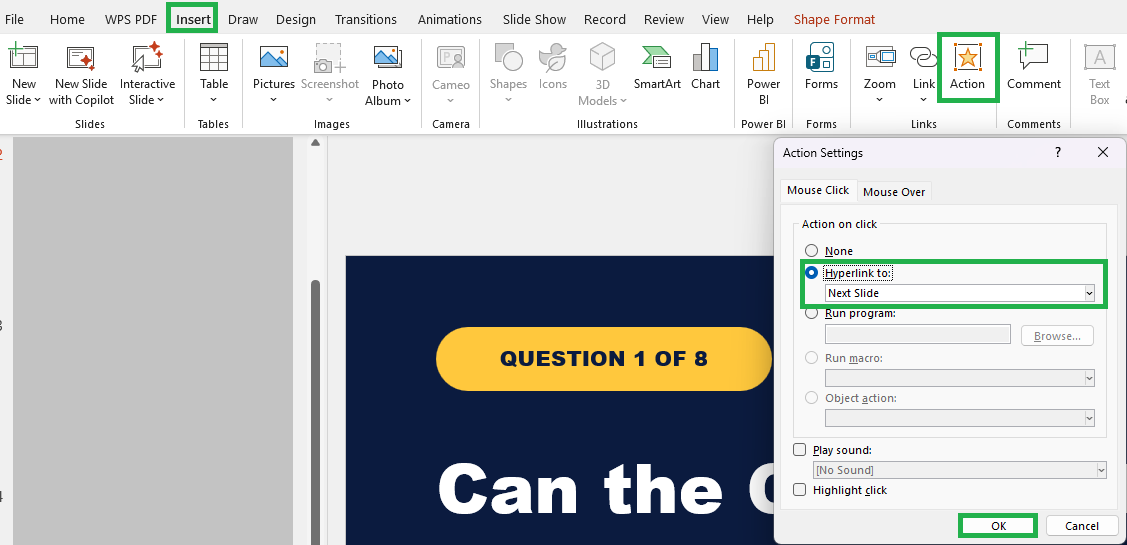
    2. Select the shape, then Insert → Action.
    3. Under Mouse Click, choose Hyperlink to and select the destination slide.
    4. Test in Slide Show view.

    Action buttons can navigate to specific slides without VBA, but navigation alone does not persist or summarize responses.^5^


    References

    1. Use ActiveX Controls on Slides
    2. Use ActiveX Controls on Documents
    3. Save a presentation that contains VBA macros
    4. Create a self-running presentation
    5. Add commands to your presentation with action buttons | Microsoft Support
    AI-generated content may be incorrect. Read our transparency notes for more information.

    Was this answer helpful?

  2. Ruby Nguyen 3,920 Reputation points Independent Advisor
    2026-11-13T20:44:41.6533333+00:00

    Good day Todd, 

    Unfortunately, PowerPoint doesn't have a built-in survey feature that can collect and automatically save responses without Microsoft Forms, so the best option depends on whether you need to save the answers. 

    Option 1: Use action buttons if you don't need to save responses 

    This works well for an interactive kiosk presentation. 

    Create one slide for each Yes/No or multiple choice question. 

    Select Insert > Shapes and add a shape for each answer. 

    Select the shape, then go to Insert > Action. 

    Under Mouse Click, select Hyperlink to and choose the next question or result slide. 
    User's image

    Repeat these steps for the remaining questions. 

    The buttons will guide the client through the survey, but PowerPoint won't save their selections. 

    Option 2: Use VBA if you need to save responses locally 

    If the responses need to stay on the kiosk computer, you can use a macro enabled PowerPoint presentation with custom VBA code. You can go to View > Macros to create or edit the macros and add the VBA logic needed to record each response. However, this approach requires more advanced VBA knowledge and can become quite complex, so it may not be the most practical solution for a simple kiosk survey. 

    I completely understand how these limitations in PowerPoint can feel disruptive. It’s not just about aesthetics; these differences can genuinely affect how smoothly you work and navigate your day. 

    I’m really sorry, I know this isn’t the outcome you were hoping for. As a forum user, I hope you understand that I don’t have the ability to modify or escalate product issues directly. However, I strongly recommend submitting your feedback through the PowerPoint · Community. This is the most effective way to ensure your voice reaches the product team and can be considered for future improvements. Once you've submitted your feedback, feel free to share the link here in the comments. I’ll be happy to upvote it to help bring more visibility. 

    If you have any questions, please don’t hesitate to reach out at any time. 

    Thank you for your patience and understanding. 

    Was this answer helpful?

    0 comments No comments

Your answer

Answers can be marked as 'Accepted' by the question author and 'Recommended' by moderators, which helps users know the answer solved the author's problem.