Good day Todd,
Unfortunately, PowerPoint doesn't have a built-in survey feature that can collect and automatically save responses without Microsoft Forms, so the best option depends on whether you need to save the answers.
Option 1: Use action buttons if you don't need to save responses
This works well for an interactive kiosk presentation.
Create one slide for each Yes/No or multiple choice question.
Select Insert > Shapes and add a shape for each answer.
Select the shape, then go to Insert > Action.
Under Mouse Click, select Hyperlink to and choose the next question or result slide.
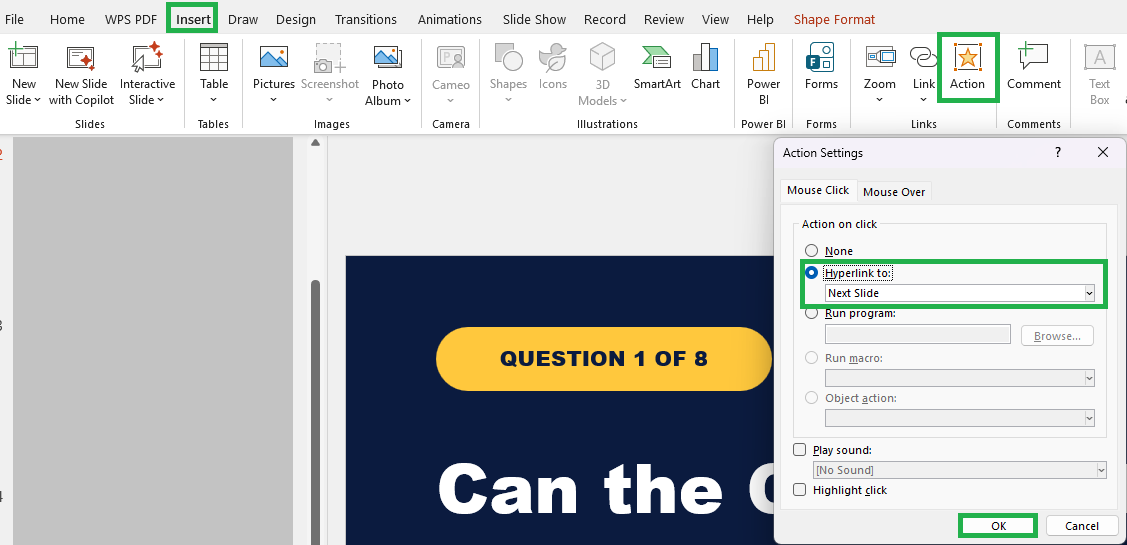
Repeat these steps for the remaining questions.
The buttons will guide the client through the survey, but PowerPoint won't save their selections.
Option 2: Use VBA if you need to save responses locally
If the responses need to stay on the kiosk computer, you can use a macro enabled PowerPoint presentation with custom VBA code. You can go to View > Macros to create or edit the macros and add the VBA logic needed to record each response. However, this approach requires more advanced VBA knowledge and can become quite complex, so it may not be the most practical solution for a simple kiosk survey.
I completely understand how these limitations in PowerPoint can feel disruptive. It’s not just about aesthetics; these differences can genuinely affect how smoothly you work and navigate your day.
I’m really sorry, I know this isn’t the outcome you were hoping for. As a forum user, I hope you understand that I don’t have the ability to modify or escalate product issues directly. However, I strongly recommend submitting your feedback through the PowerPoint · Community. This is the most effective way to ensure your voice reaches the product team and can be considered for future improvements. Once you've submitted your feedback, feel free to share the link here in the comments. I’ll be happy to upvote it to help bring more visibility.
If you have any questions, please don’t hesitate to reach out at any time.
Thank you for your patience and understanding.
' cx='32' cy='32' r='32' /%3E%3Ctext x='50%25' y='55%25' dominant-baseline='middle' text-anchor='middle' fill='%23FFF' %3ETM%3C/text%3E%3C/svg%3E)

' cx='32' cy='32' r='32' /%3E%3Ctext x='50%25' y='55%25' dominant-baseline='middle' text-anchor='middle' fill='%23FFF' %3ERN%3C/text%3E%3C/svg%3E)