Hello @VKSB ,
Thank you for reaching out. I sincerely apologize for the delay, and I am happy to support you now.
From the information shared, you can connect to the Access database and select the tables, but the Data Source Configuration Wizard fails after you click Finish with your error:
SqlClient is normally used with SQL Server, while Microsoft Access should use the OLE DB provider. This suggests the issue may be related to the project configuration or the Visual Studio Data Tools installation, rather than the Access database file itself.
Please try the following steps:
- Confirm that the project is a Visual Basic Windows Forms App (.NET Framework) or WPF App (.NET Framework), rather than a .NET 6, 7, or 8 project.
- Recreate the connection and select:
- Microsoft Access Database File
- .NET Framework Data Provider for OLE DB
- In References and Manage NuGet Packages, check whether the project contains:
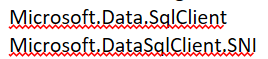
If your application uses only Access and these packages were added during troubleshooting, remove them. Then close Visual Studio, delete the project’s bin and obj folders, reopen the solution, and rebuild it.
- Create a new Visual Basic Windows Forms App (.NET Framework) project and try connecting to the same Access database.
- If the new project works, the original project likely contains an incorrect or damaged reference.
- If the new project shows the same error, the Visual Studio installation or Access provider may require repair.
- Open Visual Studio Installer, confirm that the .NET desktop development workload is installed, install available updates, and use More > Repair if the problem continues.
Please also verify that the selected tables have a primary key, as the wizard may be unable to generate update commands for tables without one.
If the error remains, please share:
- The exact Visual Studio version
- The target .NET Framework version
- Whether the database is .accdb or .mdb
- Whether Microsoft Office or the Access Database Engine is 32-bit or 64-bit
- Whether the same error occurs in a newly created project
Once again sorry for the delay, I am appreciating your patience and will use the above information to identify whether the issue is specific to the project or the Visual Studio installation.
If you found my response helpful or informative, I would greatly appreciate it if you could follow this guide for your confirmation. Thank you.

' cx='32' cy='32' r='32' /%3E%3Ctext x='50%25' y='55%25' dominant-baseline='middle' text-anchor='middle' fill='%23FFF' %3EBP%3C/text%3E%3C/svg%3E)