Azure Machine Learning
An Azure machine learning service for building and deploying models.
This browser is no longer supported.
Upgrade to Microsoft Edge to take advantage of the latest features, security updates, and technical support.
' cx='32' cy='32' r='32' /%3E%3Ctext x='50%25' y='55%25' dominant-baseline='middle' text-anchor='middle' fill='%23FFF' %3EH%3C/text%3E%3C/svg%3E)
I have loaded bankmarketing_train.csv to get a dataset and auto generated a model to predict "y" field value with AutoML.
Voting Ensemble model was generated as the best model and tested its behavior after deployed to the endpoint.
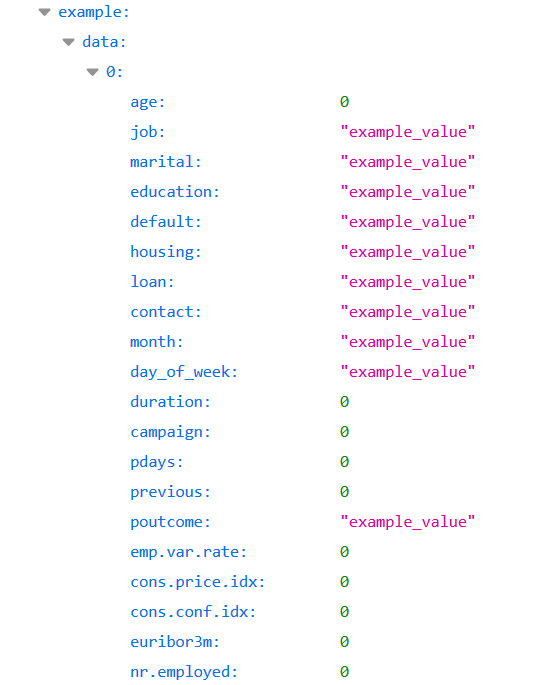
Schema is generated like this for the endpoint.
Tried with the endpoint test feature in ML Studio. It worked and responded an expected output (left side in the fig below).
But my python REST call fails with 502 Bad Gateway(right side)
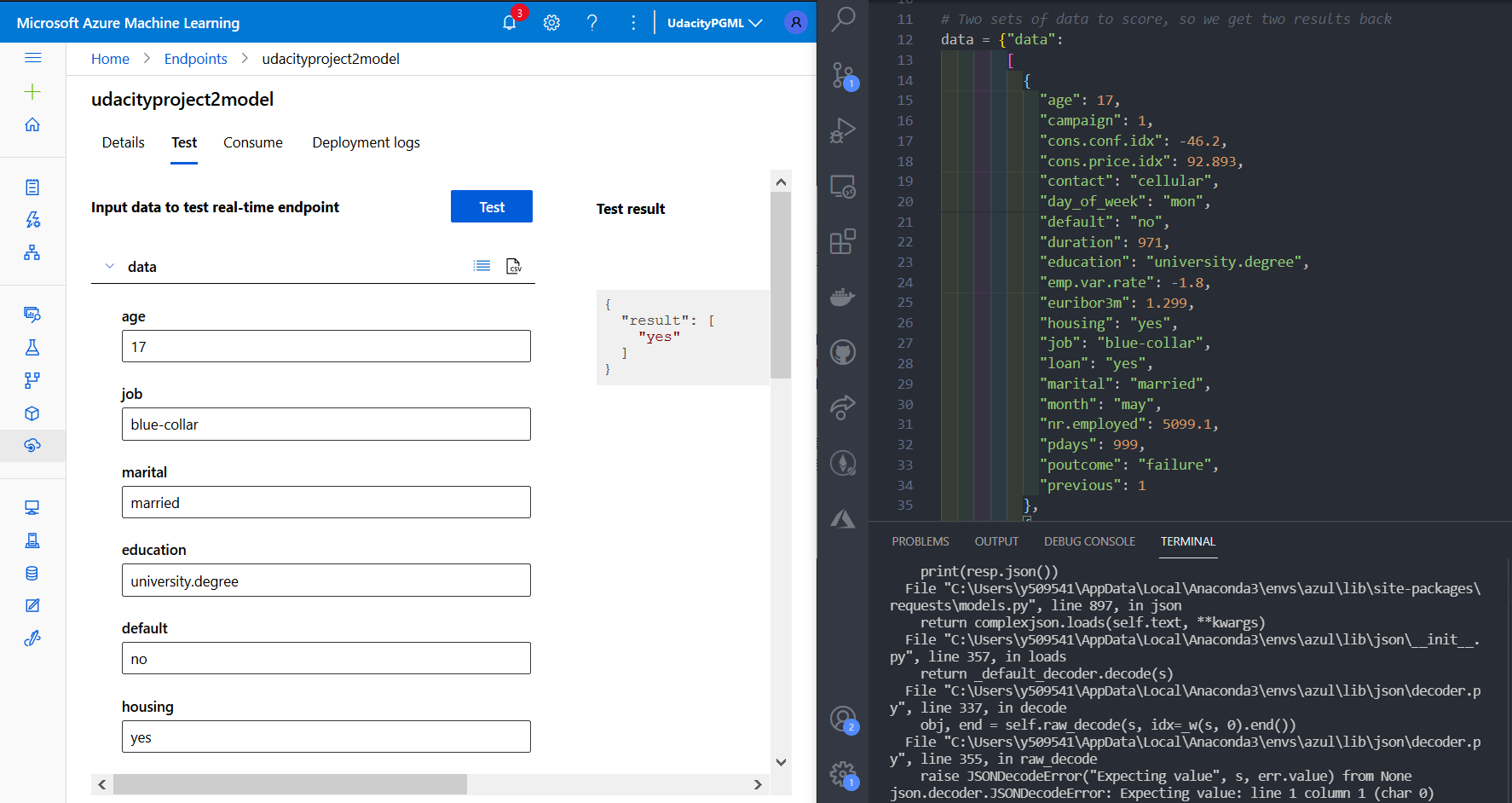
Using the REST plug-in for VSCode, I have requested as below. This also failed with the same response status code.
POST http://d8e9f6ad-4112-4417-97c0-01b4246b284a.japaneast.azurecontainer.io/score
Content-Type: application/json
Authorization: Bearer === My correct key here ===

{"data": [{"age": 87, "campaign": 1, "cons.conf.idx": -46.2, "cons.price.idx": 92.893, "contact": "cellular", "day_of_week": "mon", "default": "no", "duration": 471, "education": "university.degree", "emp.var.rate": -1.8, "euribor3m": 1.299, "housing": "yes", "job": "blue-collar", "loan": "yes", "marital": "married", "month": "may", "nr.employed": 5099.1, "pdays": 999, "poutcome": "failure", "previous": 1}]}
Investigated in the App Insight and queried the exceptions.
I found this end point tries to convert 'yes' to int value. Of course it fails.
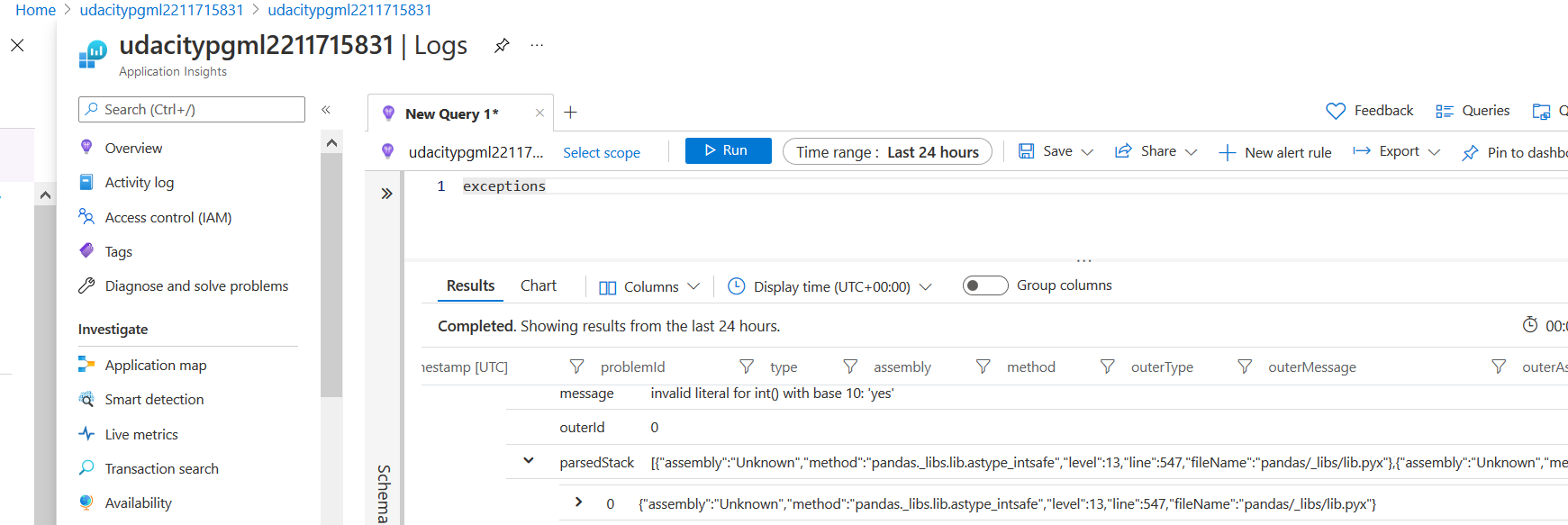
The value 'yes' is set to 'loan' and 'housing". Both are defined string value in the swagger.json for this endpoint.
What do you think?
Am I missing something?
Is this a bug with the endpoint?
An Azure machine learning service for building and deploying models.

@Hajime I think you could try to check what is the schema provided on the consume tab(next to test tab) of the endpoint to call via REST?
Ideally, if the same works on UI test tab it should work similar for REST API calls.
Hello @Rohit Mungi ,
Thank you for your reply.
Yes, I already have tried that several times. But the result has been the same.
Is there any place to find the generated request with the 'test' tab?
I could see my failed request when I try to fail it and the data passed in deployment logs tab.

Could you also try to use the input data as mentioned in the consume tab with proper single and double quotes for key and values in JSON? I am not sure if this could be causing the issue as seen in your request above.
data = {
    "Inputs": {
        "WebServiceInput0":
        [
            {
                'CulmenLength': "39.1",
                'CulmenDepth': "18.7",
                'FlipperLength': "181",
                'BodyMass': "3750",
            },
        ],
    },
    "GlobalParameters": {
    }
}

body = str.encode(json.dumps(data))
Yes, I tried that. Following is the code coming from the consume, the values are set accordingly.
import urllib.request
import json
import os
import ssl

def allowSelfSignedHttps(allowed):
    # bypass the server certificate verification on client side
    if allowed and not os.environ.get('PYTHONHTTPSVERIFY', '') and getattr(ssl, '_create_unverified_context', None):
        ssl._create_default_https_context = ssl._create_unverified_context

allowSelfSignedHttps(True) # this line is needed if you use self-signed certificate in your scoring service.

# Request data goes here

data = {"data":
        [
          {
            "age": "17",
            "campaign": "1",
            "cons.conf.idx": "-46.2",
            "cons.price.idx": "92.893",
            "contact": "cellular",
            "day_of_week": "mon",
            "default": "no",
            "duration": "971",
            "education": "university.degree",
            "emp.var.rate": "-1.8",
            "euribor3m": "1.299",
            "housing": "yes",
            "job": "blue-collar",
            "loan": "yes",
            "marital": "married",
            "month": "may",
            "nr.employed": "5099.1",
            "pdays": "999",
            "poutcome": "failure",
            "previous": "1"
          }
      ]
    }


body = str.encode(json.dumps(data))

url = 'http://d8e9f6ad-4112-4417-97c0-01b4246b284a.japaneast.azurecontainer.io/score'
api_key = '<key>' # Replace this with the API key for the web service
headers = {'Content-Type':'application/json', 'Authorization':('Bearer '+ api_key)}

req = urllib.request.Request(url, body, headers)

try:
    response = urllib.request.urlopen(req)

    result = response.read()
    print(result)
except urllib.error.HTTPError as error:
    print("The request failed with status code: " + str(error.code))

    # Print the headers - they include the requert ID and the timestamp, which are useful for debugging the failure
    print(error.info())
    print(json.loads(error.read().decode("utf8", 'ignore')))
The result was the same. 'yes' was tried to cast to int and failed.
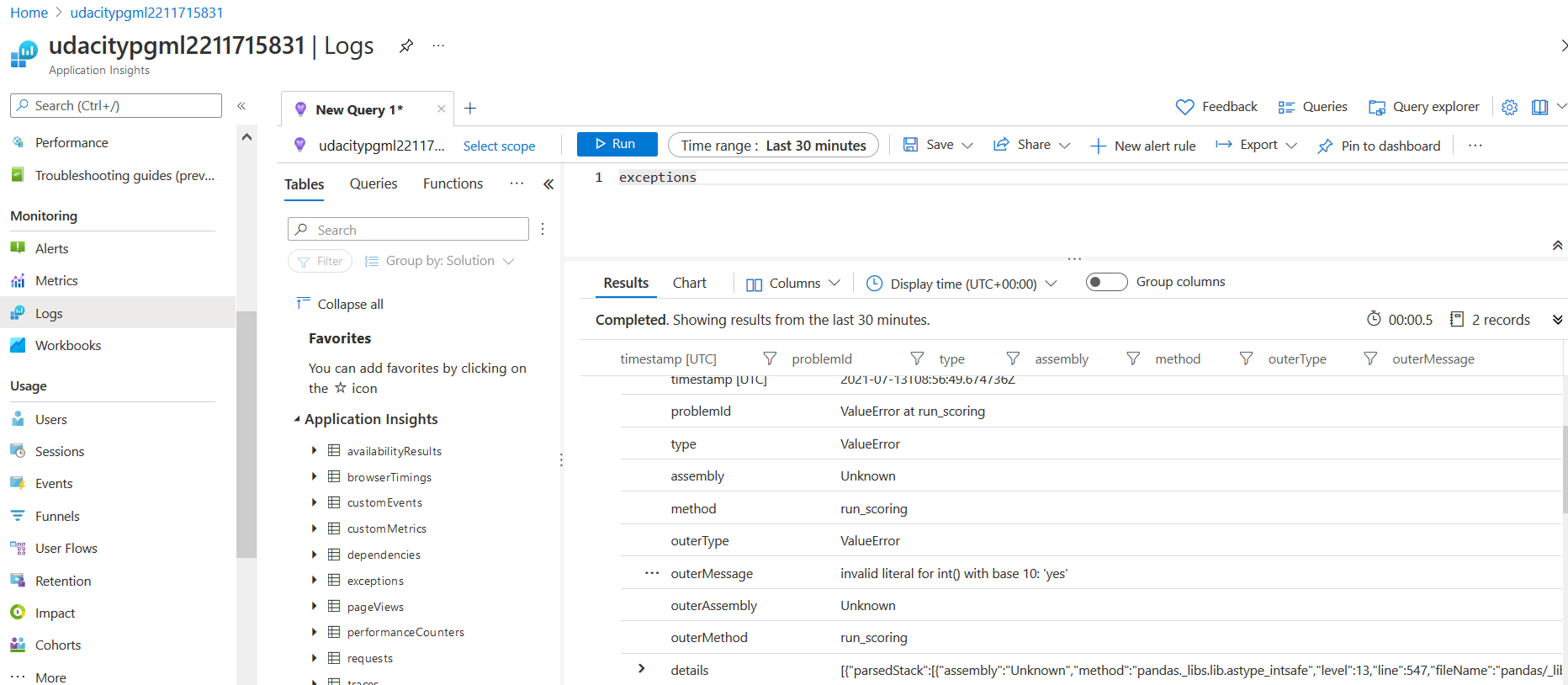
In the deployment log, following exception observed. Something is happening inside the server call, which I cannot see.
2021-07-13 08:56:49,684 | root | ERROR | Encountered Exception: Traceback (most recent call last):
  File "/var/azureml-server/synchronous/routes.py", line 64, in run_scoring
    response = invoke_user_with_timer(service_input, request_headers)
  File "/var/azureml-server/synchronous/routes.py", line 97, in invoke_user_with_timer
    result = user_main.run(**params)
  File "/azureml-envs/azureml_429e58b1641c78c2352efc8ad21c49d9/lib/python3.6/site-packages/wrapt/wrappers.py", line 567, in __call__
    args, kwargs)
  File "/azureml-envs/azureml_429e58b1641c78c2352efc8ad21c49d9/lib/python3.6/site-packages/inference_schema/schema_decorators.py", line 57, in decorator_input
    kwargs[param_name] = _deserialize_input_argument(kwargs[param_name], param_type, param_name)
  File "/azureml-envs/azureml_429e58b1641c78c2352efc8ad21c49d9/lib/python3.6/site-packages/inference_schema/schema_decorators.py", line 285, in _deserialize_input_argument
    input_data = param_type.deserialize_input(input_data)
  File "/azureml-envs/azureml_429e58b1641c78c2352efc8ad21c49d9/lib/python3.6/site-packages/inference_schema/parameter_types/pandas_parameter_type.py", line 79, in deserialize_input
    data_frame = data_frame.astype(dtype=converted_types)
  File "/azureml-envs/azureml_429e58b1641c78c2352efc8ad21c49d9/lib/python3.6/site-packages/pandas/core/generic.py", line 5865, in astype
    dtype=dtype[col_name], copy=copy, errors=errors, **kwargs
  File "/azureml-envs/azureml_429e58b1641c78c2352efc8ad21c49d9/lib/python3.6/site-packages/pandas/core/generic.py", line 5882, in astype
    dtype=dtype, copy=copy, errors=errors, **kwargs
  File "/azureml-envs/azureml_429e58b1641c78c2352efc8ad21c49d9/lib/python3.6/site-packages/pandas/core/internals/managers.py", line 581, in astype
    return self.apply("astype", dtype=dtype, **kwargs)
  File "/azureml-envs/azureml_429e58b1641c78c2352efc8ad21c49d9/lib/python3.6/site-packages/pandas/core/internals/managers.py", line 438, in apply
    applied = getattr(b, f)(**kwargs)
  File "/azureml-envs/azureml_429e58b1641c78c2352efc8ad21c49d9/lib/python3.6/site-packages/pandas/core/internals/blocks.py", line 559, in astype
    return self._astype(dtype, copy=copy, errors=errors, values=values, **kwargs)
  File "/azureml-envs/azureml_429e58b1641c78c2352efc8ad21c49d9/lib/python3.6/site-packages/pandas/core/internals/blocks.py", line 643, in _astype
    values = astype_nansafe(vals1d, dtype, copy=True, **kwargs)
  File "/azureml-envs/azureml_429e58b1641c78c2352efc8ad21c49d9/lib/python3.6/site-packages/pandas/core/dtypes/cast.py", line 707, in astype_nansafe
    return lib.astype_intsafe(arr.ravel(), dtype).reshape(arr.shape)
  File "pandas/_libs/lib.pyx", line 547, in pandas._libs.lib.astype_intsafe
ValueError: invalid literal for int() with base 10: 'yes'

During handling of the above exception, another exception occurred:

Traceback (most recent call last):
  File "/azureml-envs/azureml_429e58b1641c78c2352efc8ad21c49d9/lib/python3.6/site-packages/flask/app.py", line 1832, in full_dispatch_request
    rv = self.dispatch_request()
  File "/azureml-envs/azureml_429e58b1641c78c2352efc8ad21c49d9/lib/python3.6/site-packages/flask/app.py", line 1818, in dispatch_request
    return self.view_functions[rule.endpoint](**req.view_args)
  File "/var/azureml-server/synchronous/routes.py", line 43, in score_realtime
    return run_scoring(service_input, request.headers, request.environ.get('REQUEST_ID', '00000000-0000-0000-0000-000000000000'))
  File "/var/azureml-server/synchronous/routes.py", line 77, in run_scoring
    raise RunFunctionException(str(exc))
run_function_exception.RunFunctionException
@Hajime I think we've checked all steps that we can check and call the endpoint. The issue could be with the underlying endpoint where the studio is handling this conversion during test but it cannot be consumed correctly in reality. Is it possible for you to provide the error of the screen shot and a brief description of issue directly from ML studio portal?
This should enable the right team to get in contact with you and advise.

We just ran into this issue as well. Found out that the order of properties in the "data" structure must match exactly with the order of columns in the dataset.
This does not make sense to me, since the property names are passed in the json, why would the order matter also?
On top of that, we use C#, and the example code generated in the Azure ML Portal looks like:
using (var client = new HttpClient(handler))
        {
            // Request data goes here
            var scoreRequest = new Dictionary<string, List<Dictionary<string, string>>>()
            {
                {
                    "data",
                    new List<Dictionary<string, string>>()
                    {
                        new Dictionary<string, string>()
                        {
This uses a Dictionary for the properties, but the order of elements in a C# Dictionary is undefined and it does not guarantee the order when reading elements from it.
So the generated/example C# code is prone to errors.
Is this a known issue? Or am I missing something here?
Thanks in advance!
I got a response from MS together with a workaround. I have confirmed the workaround is effective in this case.
The order of keys should be the same as the one defined in the model schema.
After I update the data definition in my client python file, it starts working.
data = {"data":
        [
          {
            "age": 17,
            "job": "blue-collar",
            "marital": "married",
            "education": "university.degree",
            "default": "no",
            "housing": "yes",
            "loan": "yes",
            "contact": "cellular",
            "month": "may",
            "day_of_week": "mon",
            "duration": 971,
            "campaign": 1,
            "pdays": 999,
            "previous": 1,
Thank you.
OK, I will.
Thank you for your support > @Rohit Mungi