Cost Management
A Microsoft offering that enables tracking of cloud usage and expenditures for Azure and other cloud providers.
This browser is no longer supported.
Upgrade to Microsoft Edge to take advantage of the latest features, security updates, and technical support.
' cx='32' cy='32' r='32' /%3E%3Ctext x='50%25' y='55%25' dominant-baseline='middle' text-anchor='middle' fill='%23FFF' %3EJL%3C/text%3E%3C/svg%3E)
I've been using the same account and email address for the last four years. As of a few weeks ago, every time I open Azure Portal, I get a modal window asking me to "Confirm my email address":
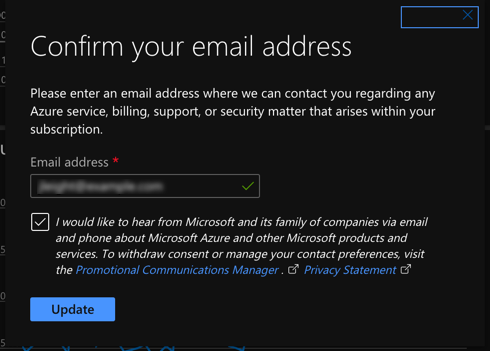
If I click the Update button, I get a confirmation that it worked:
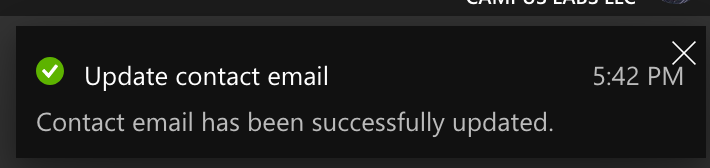
However, as soon as I open Azure Portal again, I get asked to update my email again. I've tried logging out and back in, using different browsers, and incognito mode, but it continues to ask every time I open Azure Portal.
The email address I've provided is correct. It is tied directly to my work Azure Active Directory account. If it has been sending me an email to confirm my email address, I have not received it (I checked my spam folder as well). I receive plenty of other emails from Azure so I know I can receive Azure emails.
Any help would be appreciated. Thanks!
A Microsoft offering that enables tracking of cloud usage and expenditures for Azure and other cloud providers.
Locked Question. You can vote on whether it's helpful, but you can't add comments or replies or follow the question.
' cx='32' cy='32' r='32' /%3E%3Ctext x='50%25' y='55%25' dominant-baseline='middle' text-anchor='middle' fill='%23FFF' %3EMT%3C/text%3E%3C/svg%3E)
Have you tried prompting for the verification email through "Manage how you sign in to Microsoft"?
One other thing I can think of is if you had a Premium license assigned to your account and that license expired. In that case you may either need an administrator to reset your password or you will need to have a Premium license assigned.
Are you able to access everything but just getting prompted, or are you blocked out of the portal by this?
If none of the suggested methods work, I would suggest creating a support request to get this resolved.
I am not able to sign in to that "Manage how you sign in to Microsoft" link--I assume that's because my account is an AAD account rather than actually being a Microsoft account. Normally I would have to choose to login with a "work or school account", but that link does not give me the option.
I'm not sure how I would go about checking to see if I have an expired Premium license. I asked one of our subscription admins and they also don't know what this is.
My actual usage of Azure Portal isn't affected by this--I am able to access everything. It's just very annoying having to wait for the modal to load so that I can dismiss it every time I try to do something in Portal.
Have you tried logging in on the Azure mobile app or on an entirely different computer?
I'm reaching out to the internal team to see if anyone knows why this might happen, though you might end up needing to make a ticket with the billing team.
The license admin can also check if you have a license under "licensed users", but it does not seem like not having it would cause the repeated prompts.
I'll let you know what the internal team says.
I'm getting reports that some others are experiencing this same problem, so it may be a new portal bug. I've reported this to the product team and will update you when I have a response. Thanks for calling this out!
' cx='32' cy='32' r='32' /%3E%3Ctext x='50%25' y='55%25' dominant-baseline='middle' text-anchor='middle' fill='%23FFF' %3EAC%3C/text%3E%3C/svg%3E)
It is happening again now.
I have had this for the last month or so.
Super annoying!
And no, Microsoft, I am not going to check the checkbox about receiving spam!