
run cmd as administrator
create netrun.bat file !!
sc stop FDResPub
pause
sc start FDResPub
sc query fdrespub
This browser is no longer supported.
Upgrade to Microsoft Edge to take advantage of the latest features, security updates, and technical support.

Hello All,
Does anybody see the local computer in the list of computers in Explorer's "Network" view?
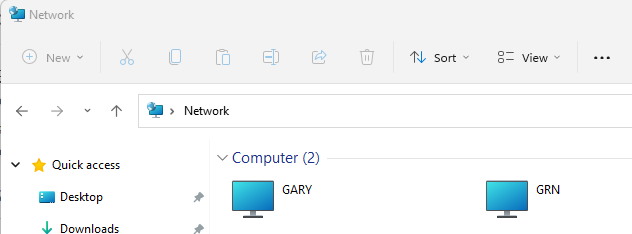
The reason that I am asking is that I think that I have discovered why it does not appear in my list and, if the idea is correct, I would not expect any Windows 11 system to show the local computer.
I think that there has been a long-term problem/bug in evaluating Windows Filtering Platform (WFP) filters for loopback traffic that had been disguised by default settings in Windows 10. A default has changed in Windows 11 and this has allowed the problem to become more visible.
The "missing" local computer is just an easily verifiable manifestation of the problem and not a big problem itself, but I think that some other problems that I have seen in forums might have the same root cause.
Update: I have written about the suspected problem and its causes in more detail at: https://gary-nebbett.blogspot.com/2022/04/windows-filtering-platform-loopback.html
Gary

Well I know I'm just a sample size of 1 person, but I checked here and I do not see my local PC in this view (I do see other computers on the same LAN). I do have network file sharing/discovery enabled and my network type is set to Private (simple home network).
Hello @@CmdrKeene ,
Thanks for the reply. I am retired, so I don't have access to a wide sample of systems to check this behaviour. I am writing an explanation of what I think that I have discovered and the techniques used to do so (essentially, detailed Event Tracing for Windows (ETW)). Replies like yours will influence the content of that explanation (e.g. how much room for doubt is there).
Gary
' cx='32' cy='32' r='32' /%3E%3Ctext x='50%25' y='55%25' dominant-baseline='middle' text-anchor='middle' fill='%23FFF' %3EDE%3C/text%3E%3C/svg%3E)
After many months of trial and error, I believe I have discovered a reliable workaround for this incredibly frustrating issue, and it was right in front of me all along. For the many years I have been using Microsoft peer-to-peer networking at home, going all the way back to the early versions of Windows, I have always made sure that all of my systems were assigned to the same workgroup. I recently updated my wife's desktop system to Windows 11, at which time it could "see itself" in the network folder. Following my old practice, I changed that system's workgroup to the same name as the other 3 computers, and it promptly disappeared from the network folder. Recalling that I had long experienced this problem with one of my other systems, I switched it to a different workgroup, and it reappeared in the network folder. Several back and forth experiments verified that this works every time. I hope this works for others experiencing the same problem. (By the way, this issue seems to occur only on systems connected to my router via WiFi. My Ethernet-connected desktop computer has never exhibited the problem.)
' cx='32' cy='32' r='32' /%3E%3Ctext x='50%25' y='55%25' dominant-baseline='middle' text-anchor='middle' fill='%23FFF' %3EA%3C/text%3E%3C/svg%3E)
How exactly (step-by-step) did you “switch it to a different workgroup”? Thanks.
' cx='32' cy='32' r='32' /%3E%3Ctext x='50%25' y='55%25' dominant-baseline='middle' text-anchor='middle' fill='%23FFF' %3ESC%3C/text%3E%3C/svg%3E)
run cmd as administrator
create netrun.bat file !!
sc stop FDResPub
pause
sc start FDResPub
sc query fdrespub
' cx='32' cy='32' r='32' /%3E%3Ctext x='50%25' y='55%25' dominant-baseline='middle' text-anchor='middle' fill='%23FFF' %3EFG%3C/text%3E%3C/svg%3E)
That seems similar to what I reported back on Aug 9, 2023.
net stop FDResPub
net start FDResPub
Why is MS not fixing this problem?
' cx='32' cy='32' r='32' /%3E%3Ctext x='50%25' y='55%25' dominant-baseline='middle' text-anchor='middle' fill='%23FFF' %3EA%3C/text%3E%3C/svg%3E)
For all of you, check the following answer from Hania Lian. I was going nuts scouring the net for a fix. This solved my problem:
Hania Lian, thank you.
' cx='32' cy='32' r='32' /%3E%3Ctext x='50%25' y='55%25' dominant-baseline='middle' text-anchor='middle' fill='%23FFF' %3ETB%3C/text%3E%3C/svg%3E)
Andre - I'm coming across this post fighting the fight that everyone on here has been going at for quite some time now. I read through the article that you posted but it is pretty dense to the uneducated (at least to me)... I didn't see what consisted of a "fix" listed. Can you help me understand what the fix is? My PC not showing up in Network is slowly driving me insane and just wan t the d*mn thing to work. Thank you for your help man.
' cx='32' cy='32' r='32' /%3E%3Ctext x='50%25' y='55%25' dominant-baseline='middle' text-anchor='middle' fill='%23FFF' %3EAK%3C/text%3E%3C/svg%3E)
I'm having this problem with a fresh implementation of Windows 11. The fastest fix I've found is : Settings, Network, Advanced Network, Advanced Sharing and just turn the Network Discovery option and the File and Printer Sharing option off and on. The PC will now be visible in Explorer. Turning an option off and on is an old trick.
' cx='32' cy='32' r='32' /%3E%3Ctext x='50%25' y='55%25' dominant-baseline='middle' text-anchor='middle' fill='%23FFF' %3EJR%3C/text%3E%3C/svg%3E)
Yeah this works for me. I find this issue might be more likely to happen if I start actively using my computer as soon as I turn it on and get into Windows rather than waiting a bit. Annoying. Because Sharing doesn't start working ever if you start using your computer too soon after booting and logging in.
' cx='32' cy='32' r='32' /%3E%3Ctext x='50%25' y='55%25' dominant-baseline='middle' text-anchor='middle' fill='%23FFF' %3EJJ%3C/text%3E%3C/svg%3E)
Thanks. I had not tried the off on trick but it did fix my concern.
' cx='32' cy='32' r='32' /%3E%3Ctext x='50%25' y='55%25' dominant-baseline='middle' text-anchor='middle' fill='%23FFF' %3ESB%3C/text%3E%3C/svg%3E)
This Fix worked on one computer, but not the other two, sadly.
The only workaround that seems to make the local PC visible again is by doing these 2 commands.
This problem has been going on for years and MS never came up with a proper fix.
net stop FDResPub
net start FDResPub
Hello F G,
I wrote about this problem here: https://gary-nebbett.blogspot.com/2021/05/network-discovery-and-name-resolution.html
A workaround for the problem is to add a service dependency to the FDResPub service on the LanmanWorkstation service.
Gary
' cx='32' cy='32' r='32' /%3E%3Ctext x='50%25' y='55%25' dominant-baseline='middle' text-anchor='middle' fill='%23FFF' %3EK%3C/text%3E%3C/svg%3E)
This almost always works but its effect will not survive a reboot. Tried adding this as a batch file running periodically but the results were unsatisfying and fleeting. I just gave up since it's such a minor, non-critical issue. But it still bugs the you-know-what out of me.
Hello khisel,
Can you explain how/why an added service dependency (which updates the service definition in the registry) does not survive a reboot?
Gary
Gary, I was responding to the "net stop FDResPub/net start FDResPub" message from F G. That works temporarily but not after a reboot. Sorry for the ambiguity.
' cx='32' cy='32' r='32' /%3E%3Ctext x='50%25' y='55%25' dominant-baseline='middle' text-anchor='middle' fill='%23FFF' %3EMK%3C/text%3E%3C/svg%3E)
Oh my god, really just restarting this shit service is resolving the problem. Thank you man for help
You can toggle Network Discovery in the Sharing Settings as well and then refresh the Network File Explorer window. It usually requires the refresh.
' cx='32' cy='32' r='32' /%3E%3Ctext x='50%25' y='55%25' dominant-baseline='middle' text-anchor='middle' fill='%23FFF' %3EKC%3C/text%3E%3C/svg%3E)
Took forever and a lot of pulling of hair to find this, but it worked.
' cx='32' cy='32' r='32' /%3E%3Ctext x='50%25' y='55%25' dominant-baseline='middle' text-anchor='middle' fill='%23FFF' %3EGF%3C/text%3E%3C/svg%3E)
for the ones that dont want it to stop working after reboot, change the initialization type to automatic (default is manual).
The english name of this service is "Function Discovery Resource Publication"
' cx='32' cy='32' r='32' /%3E%3Ctext x='50%25' y='55%25' dominant-baseline='middle' text-anchor='middle' fill='%23FFF' %3EDT%3C/text%3E%3C/svg%3E)
OK, I've tried everything that everyone on the Internet came up with to fix this problem. Some didn't work, others did, but were only temporary. I even installed SMB 1. It worked all the time, but has some major security flaws so I removed it from my machine. Restarting FDResPub was the best solution. I even have a Task scheduled to run it for me, but alas, it wasn't something that consistently worked and stayed working all the while my PC was running all day. Even running the command //PCNAME didn't stick. And who wants to turn Network Discovery off and then on every time you reboot? It doesn't actually work anyways. I can't even remember all the other "solutions" I tried, and they all failed.
Bring on Gary Nebbett! So, I tried adding "LanmanWorkstation" to the dependencies for "FDResPub". Rebooted, and it didn't work. WTH!?!?! OK, I forgot that the Task to restart RDResRub was still enabled. I disabled the task, and rebooted once again. After refreshing File Explorer and checking the network drives, my machine and all the others on the network were there. SUCCESS!! It's only be working for a couple of hours now, but that's better than most. THANK YOU Gary!! And yes, it does survive a reboot!!
UPDATE!
So, it's the next day, and it appears that I may have spoken too soon yesterday regarding this solution. I started my machine this morning, and this afternoon I finally got around to checking to see if my PC still showed up in File Explorer under Network.
It did NOT!! Another failure.
I checked the registry, and "LanmanWorkstation" is still showing up as a dependency for "FDResPub". And once again, we were so close to a working solution, but alas...
The best solution would be for Microsoft to actually FIX the problem. There can't be thousands of people on the Internet looking for a solution to this problem if there isn't a problem with the Microsoft code somewhere. After all, we don't all have wonky PC's, so the only common denominator appears to be Windows 11.
MICROSOFT, FIX IT!!!
cmd as adminstrator
sc stop FDResPub
sc start FDResPub
sc query fdrespub
' cx='32' cy='32' r='32' /%3E%3Ctext x='50%25' y='55%25' dominant-baseline='middle' text-anchor='middle' fill='%23FFF' %3EB%3C/text%3E%3C/svg%3E)
FYI, I just stumbled upon an apparent fix with my new win11 pc not showing up in its own local file explorer 'network' folder by simply installing 'virtual machine platform' in windows features.
For whatever reason my local win11 PC and wireless networked printer/scanner have been showing up consistently ever since, go figure.... DOH!
Tested successfully with several reboots, YMMV...
Unfortunately, this fix didn't hold long term. After coming out of sleep mode (laptop) or refreshing the network folder, both the local win11p computer and wireless networked printer disappeared again however, both devices reappear again after a reboot---> for awhile which is only better than not at all as before...
I run a simple private networked 'workgroup' with 3 windows pc's, 1-win11p and 2-win10p. Both of the win10p pc's see all networked devices fine, the only one with this issue is the new win11p pc.
This is basic networking 101 stuff MS, is anyone listening?
Hello Bonzer2u,
There is a link in my first message that leads to a more detailed description of the problem and includes a "pktmon" trace command. If you are prepared to perform that trace and share the captured data, then I would see if I can determine why the wireless printer/scanner is not appearing in the list of discovered devices.
Gary
' cx='32' cy='32' r='32' /%3E%3Ctext x='50%25' y='55%25' dominant-baseline='middle' text-anchor='middle' fill='%23FFF' %3EDH%3C/text%3E%3C/svg%3E)
I still had the problem WITH virtual machine, so I put in all features having ANYTHING to do with networking or support there of. First glance the problem is fixed. My old clunky Epson I use only for faxing/scanning anymore is gone most of the time, but sometimes appears. Probably a problem with the printer. Avoid Epson. Various nuisances will likely relegate any unit to trash or partial use. Printing is NEVER problem-free.
' cx='32' cy='32' r='32' /%3E%3Ctext x='50%25' y='55%25' dominant-baseline='middle' text-anchor='middle' fill='%23FFF' %3EJD%3C/text%3E%3C/svg%3E)
I have a Windows 10 computer and it was unable to see my Windows 11 computer in File Explorer Network. I installed the "Virtual Machine Platform" in the Windows 10 computer and now the Windows 11 computer is visible on the Windows 10 computer network in File Explorer