I Request a "Passkey" for msdt.exe

Arone Mmbaga 0 Reputation points
2026-03-14T05:08:40.0133333+00:00

I launched the diagnostic command to fix some problems in my pc but the app requires a passkey provided by my Microfst tech. So, I request one.

I am Arone

Windows for home | Windows 11 | PC Health Checker
0 comments No comments

3 answers

Sort by: Most helpful
  1. ChrisSolomon 51 Reputation points
    2026-10-14T09:12:46.0066667+00:00

    that's assuming the 'new' troubleshooters even work. ever since the new troubleshooters were introduced, they always fail after clicking 'yes' when asking permission to run automated diagnostics. it has always done that. the only trouble shooter i have found that works is the one for audio. it is this way on two different systems of the same exact configuration.

    Was this answer helpful?

    0 comments No comments

  2. Ramesh Srinivasan 88,890 Reputation points Independent Advisor
    2026-03-14T06:21:25.9233333+00:00

    Hi Arone,

    The msdt.exe command, when run without arguments, asks for a passkey. If you need to run a troubleshooter, please use Settings so that the appropriate argument is used.

    Go to Start → Settings → System → Troubleshoot → Other Troubleshooters. Select the correct troubleshooter for your issue.

    Note: The legacy troubleshooters are deprecated and they've been moved to the Get Help platform. You can read more about it in this article → Deprecation of Microsoft Support Diagnostic Tool (MSDT) and MSDT Troubleshooters - Microsoft Support

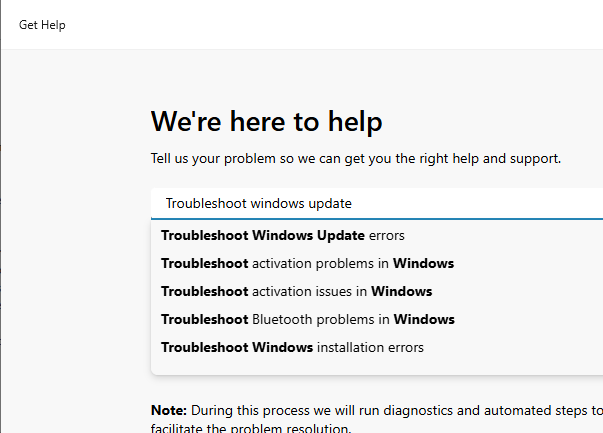
    To run a troubleshooter in the Get Help platform, you can use this method.

    Press Win + R, type ms-contact-support:// and click OK.

    Type "Troubleshoot" and pick one of the troubleshooters appearing in the dropdown.
    enter image description here

    To run the Windows Update Troubleshooter, type Troubleshoot windows update and pick the appropriate entry in the dropdown.

    Was this answer helpful?

    0 comments No comments

  3. AI answer

    2026-03-14T05:08:54.49+00:00

    A passkey for msdt.exe cannot be generated or provided here.

    The /dci <passkey> parameter in msdt is only used when a support provider (for example, Microsoft Support in an active support case or an OEM/IT admin) explicitly supplies a passkey tied to a specific diagnostic package. Without an active support case that includes such a passkey, msdt cannot be used in that mode.

    To proceed:

    1. Run built‑in troubleshooters without a passkey
      • Open Settings → System → Troubleshoot → Other troubleshooters in Windows 11.
      • Run the relevant troubleshooter (e.g., Internet, Audio, Windows Update) directly from there. These do not require msdt passkeys.
    2. If a support engineer specifically asked to run msdt with /dci
      • You must obtain the passkey directly from that support engineer or organization.
      • The passkey is not generic and cannot be reused or requested publicly.
    3. Prefer newer tools
      • The Microsoft Support Diagnostic Tool (MSDT) is deprecated. For new troubleshooting scenarios, use the Windows 11 Settings troubleshooters or guidance from current support articles instead of starting msdt manually.

    References:

    AI-generated content may be incorrect. Read our transparency notes for more information.

    Was this answer helpful?

Your answer

Answers can be marked as 'Accepted' by the question author and 'Recommended' by moderators, which helps users know the answer solved the author's problem.