System Specs:
OS: Windows 11 Home Ver 24H2
CPU: i5-13600K
RAM: 96GB DDR5 Corsair Vengeance (2x 48GB Sticks)
MOBO: Gigabyte B760 AORUS ELITE AX
GPU: Gigabyte RTX 4070 TI SUPER
Storage: 5TB over various SSD/HDDs
The Issue:
The is no way for me to force a replication of this issue, it is random and intermittent, but the issue seems to occur within the same set of variable:
Setting my desktop to sleep - either manually or once it reaches a period of time in which it should automatically sleep will cause the desktop to wake as if a reboot has occurred. When this occurs, the computer turns on as if exiting sleep - not shutdown, so the reboot appears to be a complete unexpected system restart either during sleep or upon exiting sleep. I have never seen the reboot occur and am unable to verify when exactly this issue is occurring.
I have tried manual troubleshooting over the past 2 weeks+ to try replicate and solve this issue, having thought it was solved by a BIOS update I had noticed it had once again occurred overnight.
My Troubleshooting:
At first I had been checking the Event Viewer for an understanding and possible diagnosis, the same common events would occur prior to the error occurring (I also notice that often there is a Error EVENTLOG ID 6008 claiming 'The previous system shutdown at 3:20:47 AM on 8/6/2025 was unexpected.' Though this error was reported in the Event Viewer at 8/6/2025 at 4:50:51 PM, not sure if this is related but generally whenever I notice this has occurred there will be a similar message). The events are as follows: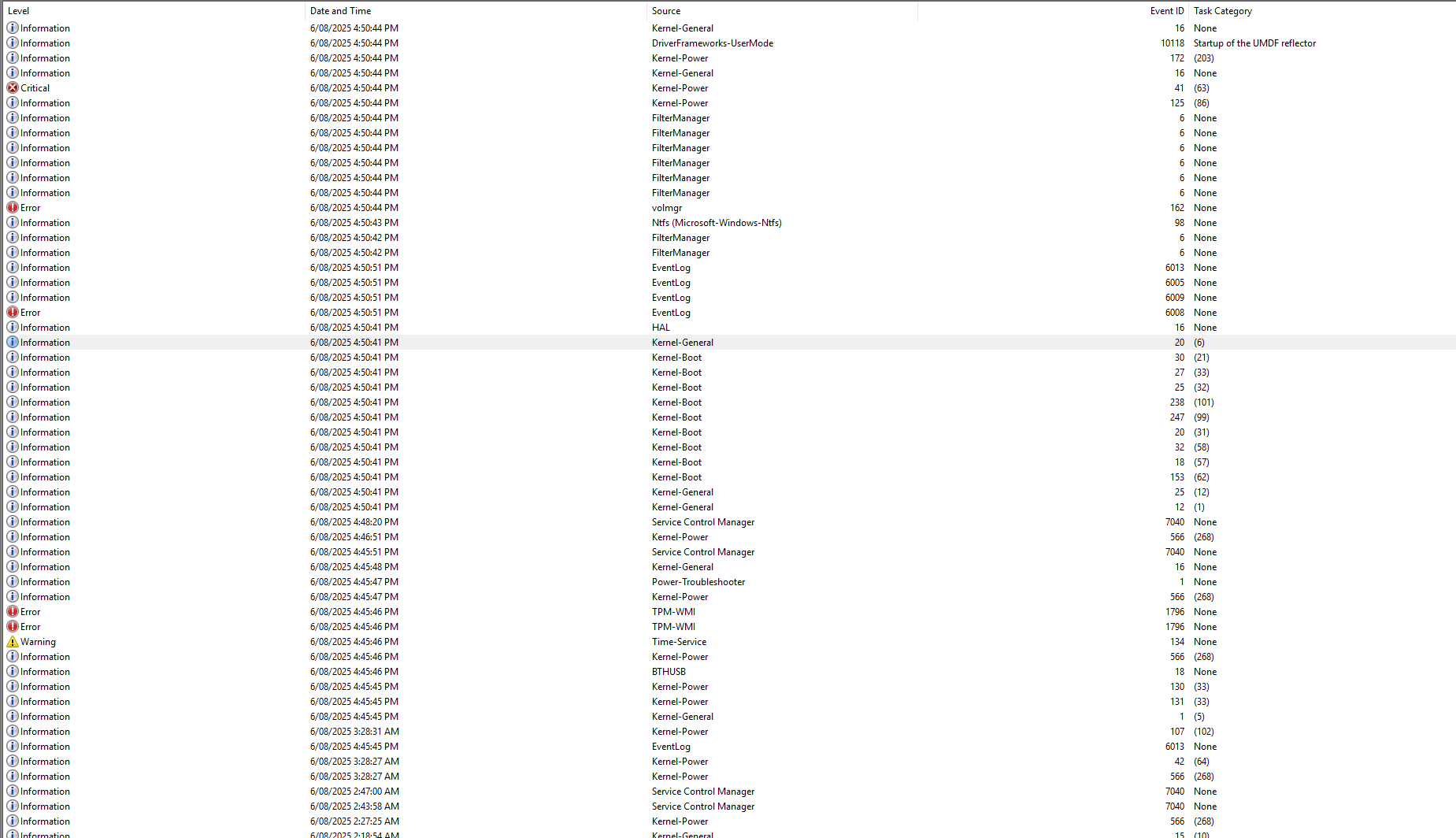
(Please let me know if more information is required regarding specific events)
Particular events that always stick out to me are:
- EVENT ID 125 - ACPI thermal zone _TZ.TZ00 has been enumerated. _PSV = 0K _TC1 = 0 _TC2 = 0 _TSP = 0ms _AC0 = 353K _AC1 = 328K _AC2 = 323K _AC3 = 318K _AC4 = 313K _AC5 = 0K _AC6 = 0K _AC7 = 0K _AC8 = 0K _AC9 = 0K _CRT = 378K _HOT = 0K minimum throttle = 0 _CR3 = 0K
and
- EVENT ID 6 - File System Filter 'npsvctrig' (10.0, 1978-05-14T19:13:30.000000000Z) has successfully loaded and registered with Filter Manager.
These are often the two events that lead prior to when the reboot seemingly occurs.
Outside of Event Viewer, I have troubleshooted a few different ways - including using WhoCrashed, in which I have been able to attribute the Unexpected Shutdowns correlating to Bugcheck Name: KERNEL_MODE_HEAP_CORRUPTION, which Bugcheck Code: 0x13A(often different codes will occur in brackets just after but seem to change each time it occurs).
WhoCrashed Analysis claims 'This is a typical software problem. Most likely this is caused by a bug in a driver.'
Next I checked my Windows Minidump and opened it with WinDbg. There I analyzed the minidump and received the following:
Debugging Details:
------------------

*** WARNING: Unable to verify timestamp for nvlddmkm.sys
fffff803e4dc44c0: Unable to get MiVisibleState
Unable to get NonPagedPoolStart
Unable to get NonPagedPoolEnd
Unable to get PagedPoolStart
Unable to get PagedPoolEnd
HeapDbgInitExtension Failed

KEY_VALUES_STRING: 1

    Key  : Analysis.CPU.mSec
    Value: 1984

    Key  : Analysis.Elapsed.mSec
    Value: 10284

    Key  : Analysis.IO.Other.Mb
    Value: 1

    Key  : Analysis.IO.Read.Mb
    Value: 1

    Key  : Analysis.IO.Write.Mb
    Value: 25

    Key  : Analysis.Init.CPU.mSec
    Value: 1453

    Key  : Analysis.Init.Elapsed.mSec
    Value: 828279

    Key  : Analysis.Memory.CommitPeak.Mb
    Value: 109

    Key  : Analysis.Version.DbgEng
    Value: 10.0.27871.1001

    Key  : Analysis.Version.Description
    Value: 10.2505.01.02 amd64fre

    Key  : Analysis.Version.Ext
    Value: 1.2505.1.2

    Key  : Bugcheck.Code.LegacyAPI
    Value: 0x13a

    Key  : Bugcheck.Code.TargetModel
    Value: 0x13a

    Key  : Dump.Attributes.AsUlong
    Value: 0x21008

    Key  : Dump.Attributes.DiagDataWrittenToHeader
    Value: 1

    Key  : Dump.Attributes.ErrorCode
    Value: 0x0

    Key  : Dump.Attributes.KernelGeneratedTriageDump
    Value: 1

    Key  : Dump.Attributes.LastLine
    Value: Dump completed successfully.

    Key  : Dump.Attributes.ProgressPercentage
    Value: 0

    Key  : Failure.Bucket
    Value: 0x13a_8____7_nvlddmkm!unknown_function

    Key  : Failure.Hash
    Value: {46c4c728-1835-024f-7a9c-4a4010d1d764}


BUGCHECK_CODE:  13a

BUGCHECK_P1: 8

BUGCHECK_P2: ffffb105d1100140

BUGCHECK_P3: ffffb106978bffe0

BUGCHECK_P4: 0

FILE_IN_CAB:  080625-10843-01.dmp

DUMP_FILE_ATTRIBUTES: 0x21008
  Kernel Generated Triage Dump

FAULTING_THREAD:  ffffb106364cc340

POOL_ADDRESS: Unable to get NonPagedPoolStart
Unable to get NonPagedPoolEnd
Unable to get PagedPoolStart
Unable to get PagedPoolEnd
unable to get nt!MmSpecialPagesInUse
 ffffb106978bffe0

FREED_POOL_TAG:  ___7

BLACKBOXBSD: 1 (!blackboxbsd)


BLACKBOXNTFS: 1 (!blackboxntfs)


BLACKBOXPNP: 1 (!blackboxpnp)


BLACKBOXWINLOGON: 1

CUSTOMER_CRASH_COUNT:  1

PROCESS_NAME:  System

STACK_TEXT:
fffffa80`4c8b98d8 fffff803`e43ebca8     : 00000000`0000013a 00000000`00000008 ffffb105`d1100140 ffffb106`978bffe0 : nt!KeBugCheckEx
fffffa80`4c8b98e0 fffff803`e43ebd08     : 00000000`00000008 fffffa80`4c8b9ac9 ffffb105`d1100140 ffff9a0a`c2858d60 : nt!RtlpHeapHandleError+0x40
fffffa80`4c8b9920 fffff803`e403ca61     : ffffb105`d11002c0 00000000`ffffb106 ffffb106`978bfff0 00000000`ffffb106 : nt!RtlpHpHeapHandleError+0x58
fffffa80`4c8b9950 fffff803`e42f594d     : 000000ce`00000000 ffffb105`d1105080 000000ec`00000000 ffffb105`d11002c0 : nt!RtlpLogHeapFailure+0x45
fffffa80`4c8b9980 fffff803`e40429e1     : ffffb106`978bfff0 ffffb105`d11002c0 ffffb106`978bffe0 00000000`00000000 : nt!RtlpHpVsSlotFreeList+0x1a1
fffffa80`4c8b99f0 fffff803`e4969528     : 00000000`00000000 ffffb105`d1100140 fffff803`e3e00000 00000000`0000000c : nt!RtlpHpVsContextFree+0x151
fffffa80`4c8b9a30 fffff803`8d0484c4     : ffffb106`978c0010 ffffb106`978c0010 ffffb105`d1100000 00000000`00000002 : nt!ExFreePoolWithTag+0x858
fffffa80`4c8b9b30 ffffb106`978c0010     : ffffb106`978c0010 ffffb105`d1100000 00000000`00000002 ffffb106`4615e1d0 : nvlddmkm+0xd984c4
fffffa80`4c8b9b38 ffffb106`978c0010     : ffffb105`d1100000 00000000`00000002 ffffb106`4615e1d0 00000000`00000000 : 0xffffb106`978c0010
fffffa80`4c8b9b40 ffffb105`d1100000     : 00000000`00000002 ffffb106`4615e1d0 00000000`00000000 ffffb106`978c0010 : 0xffffb106`978c0010
fffffa80`4c8b9b48 00000000`00000002     : ffffb106`4615e1d0 00000000`00000000 ffffb106`978c0010 fffff803`8c38597e : 0xffffb105`d1100000
fffffa80`4c8b9b50 ffffb106`4615e1d0     : 00000000`00000000 ffffb106`978c0010 fffff803`8c38597e 00000000`00000000 : 0x2
fffffa80`4c8b9b58 00000000`00000000     : ffffb106`978c0010 fffff803`8c38597e 00000000`00000000 fffff803`8d53d410 : 0xffffb106`4615e1d0


SYMBOL_NAME:  nvlddmkm+d984c4

MODULE_NAME: nvlddmkm

IMAGE_NAME:  nvlddmkm.sys

STACK_COMMAND: .process /r /p 0xffffb105d16cc040; .thread 0xffffb106364cc340 ; kb

BUCKET_ID_FUNC_OFFSET:  d984c4

FAILURE_BUCKET_ID:  0x13a_8____7_nvlddmkm!unknown_function

OSPLATFORM_TYPE:  x64

OSNAME:  Windows 10

FAILURE_ID_HASH:  {46c4c728-1835-024f-7a9c-4a4010d1d764}

Followup:     MachineOwner
---------
Additional Notes:
I have also attempted to re-seat hardware and check that everything is connected properly, this error did not occur nor begin to occur with any changes to the internals of my desktop. The only hardware change, which coincidentally correlates, is the addition of a new OLED monitor to replace a different monitor I had which was reaching the end of its life. The monitor itself works very well, and I doubt it has caused this issue but I never surprised when it comes to tech. I did install the driver for the monitor too, but I am unsure if this caused the issue to occur or if there is another driver that has resulted in this, as I did do a batch of new drivers around the same time.
I appreciate any help to this matter, just let me know if anything else is needed for finding the cause to this issue - I'm really hoping it's just a driver that needs to be fixed and not something painful such as a hardware fault.
Thanks, Riley.
' cx='32' cy='32' r='32' /%3E%3Ctext x='50%25' y='55%25' dominant-baseline='middle' text-anchor='middle' fill='%23FFF' %3ERB%3C/text%3E%3C/svg%3E)


' cx='32' cy='32' r='32' /%3E%3Ctext x='50%25' y='55%25' dominant-baseline='middle' text-anchor='middle' fill='%23FFF' %3EBR%3C/text%3E%3C/svg%3E)
' cx='32' cy='32' r='32' /%3E%3Ctext x='50%25' y='55%25' dominant-baseline='middle' text-anchor='middle' fill='%23FFF' %3EMZ%3C/text%3E%3C/svg%3E)
' cx='32' cy='32' r='32' /%3E%3Ctext x='50%25' y='55%25' dominant-baseline='middle' text-anchor='middle' fill='%23FFF' %3EJD%3C/text%3E%3C/svg%3E)