Hi @Ben Anderson,
I hope you are doing well.
I appreciate your time raising the issue you are experiencing in a detailed description. After my research, I want to let you know that the behavior you are experiencing is due to the current design of Premium Planner, which doesn’t support copying or moving tasks at this time.

For more information please refer to this document: Copy and move Planner tasks - Microsoft Support
I understand how important this functionality is for your workflow, therefore, I recommend submitting feedback directly to Microsoft via the Feedback Portal to help prioritize this feature in future updates.
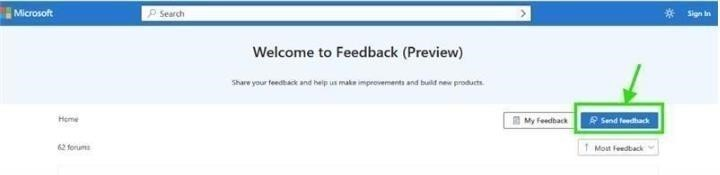
Sharing your experience through this channel is the most impactful way to advocate for a change that would benefit you and other users.
Note: As community moderators, we kindly ask for your understanding that our access to internal development details is limited. Our primary role is to guide users toward the appropriate resources and support channels. While we may not have influence product design decisions and have limited access to internal development details , we’ll continue doing our best to support you within the scope of our responsibilities.
Once you’ve submitted your feedback, feel free to share the link here. I’d be happy to upvote it to help increase its visibility. Moreover, if you are unable to submit feedback, please inform me at your convenience. In that case, I will gladly assist by submitting it on your behalf to ensure your request is properly captured.
Additionally, as other users have raised similar concerns and may not be aware of where to share their feedback, I hope this response helps clarify the situation and suggests a potential next step. Upvoting this information can make it more visible to others in the community who may be facing the same issue, making it easier for them to find guidance and contribute their feedback as well.
Thank you again for your time and for raising this important usability concern. If you have any further questions or need additional assistance, please don’t hesitate to reach out.
Wishing you a smooth rest of your day.
If you have extra questions about this answer, please click "Comment".
Note: Please follow the steps in our documentation to enable e-mail notifications if you want to receive the related email notification for this thread.
' cx='32' cy='32' r='32' /%3E%3Ctext x='50%25' y='55%25' dominant-baseline='middle' text-anchor='middle' fill='%23FFF' %3EBA%3C/text%3E%3C/svg%3E)

' cx='32' cy='32' r='32' /%3E%3Ctext x='50%25' y='55%25' dominant-baseline='middle' text-anchor='middle' fill='%23FFF' %3EJN%3C/text%3E%3C/svg%3E)
' cx='32' cy='32' r='32' /%3E%3Ctext x='50%25' y='55%25' dominant-baseline='middle' text-anchor='middle' fill='%23FFF' %3EA%3C/text%3E%3C/svg%3E)