Hi Bert,
Thank you for sharing your concern.
PowerPoint does not provide direct control over whether a slide title is exported as an H1 or H2 tag in a PDF, so the resulting heading levels may not always be consistent.
To improve the accessibility structure, ensure that:
- Go to Home > Layout and apply a built-in layout that includes a title, such as Title and Content.
-
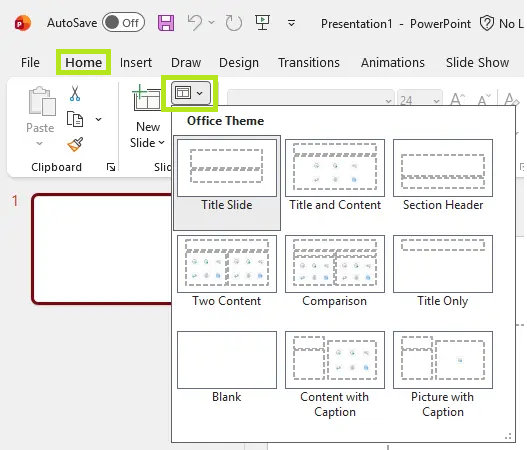
- Enter the slide title in the designated Click to add title placeholder rather than in a manually inserted text box.
- Go to Review > Check Accessibility > Reading Order Pane and confirm that the slide title appears in the correct reading order.
-
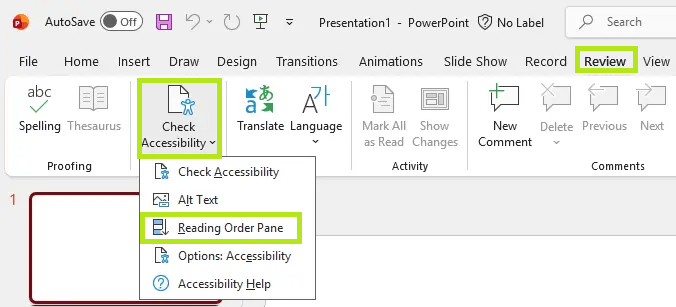
- Select File > Save As, choose PDF as the file type, and then select Options. Make sure Document structure tags for accessibility is selected before saving the PDF.
These steps can improve the exported tag structure, but PowerPoint may still not guarantee that every slide title is tagged specifically as H1. If a particular heading hierarchy is required, the PDF tags may need to be reviewed and adjusted after export using Adobe Acrobat Pro or another PDF accessibility remediation tool.
For detailed instructions, you may find this article helpful: Create accessible PDFs
I hope this information is helpful. Should you have any further questions or need additional assistance, please feel free to share them in the comments below. I will be happy to help.
If the answer is helpful, please click "Yes" and kindly upvote it.
Note: Follow the steps in the forum documentation to enable email notifications if you want to receive email notifications related to this topic.
' cx='32' cy='32' r='32' /%3E%3Ctext x='50%25' y='55%25' dominant-baseline='middle' text-anchor='middle' fill='%23FFF' %3EBV%3C/text%3E%3C/svg%3E)


' cx='32' cy='32' r='32' /%3E%3Ctext x='50%25' y='55%25' dominant-baseline='middle' text-anchor='middle' fill='%23FFF' %3ECD%3C/text%3E%3C/svg%3E)