Azure SQL Database
An Azure relational database service.
This browser is no longer supported.
Upgrade to Microsoft Edge to take advantage of the latest features, security updates, and technical support.
' cx='32' cy='32' r='32' /%3E%3Ctext x='50%25' y='55%25' dominant-baseline='middle' text-anchor='middle' fill='%23FFF' %3EPS%3C/text%3E%3C/svg%3E)
SQL Server 2019 install error Wait on the Database Engine Recovery Handle Failed this error is coming and i have tried everything on the internet to solve this but it still isnt installing can anyone tell me how to remove this error
An Azure relational database service.
An Azure service that provides a small-footprint, edge-optimized data engine with built-in artificial intelligence. Previously known as Azure SQL Database Edge.
Additional SQL Server features and topics not covered by specific categories
' cx='32' cy='32' r='32' /%3E%3Ctext x='50%25' y='55%25' dominant-baseline='middle' text-anchor='middle' fill='%23FFF' %3EA%3C/text%3E%3C/svg%3E)
We have a developer laptop (Lenovo T14 Gen2) running windows 11 where this error happens, and none of the solutions work. Tried running windows 10 on the same machine and install SQL 2019 and all works. On windows 11 it doesnt even when windows is fully updated and SQL is the first program we install after a clean windows 11 install. Any ideas of how to fix this?
' cx='32' cy='32' r='32' /%3E%3Ctext x='50%25' y='55%25' dominant-baseline='middle' text-anchor='middle' fill='%23FFF' %3EBS%3C/text%3E%3C/svg%3E)
same issue I'm also facing..
Win11 64bit
is this still on, any solutions for this..??

What issue? The error message in the title is a generic message, and there multiple possible underlying causes.
Check the SQL Server errorlog (see my post above). If you see a message about 256 unaligned I/Os, this is a known issue, and see this Microsoft article for workarounds.
Else start a new thread where you describe your problem from start to end. Don't forget to include the SQL Server errorlog.
Hi, I have uninstalled sql server and cleared the registry and sql server folder from program files as well, havent copied the error msg.
"Wait on the Database Engine recovery handle failed. Check the SQL Server error log for potential causes" this was displayed at on the msi installer wizard at last.
later restarted the system and tried installing again, same error appeared installation failed
![270907-screenshot-2022-12-15-130340.png][2]
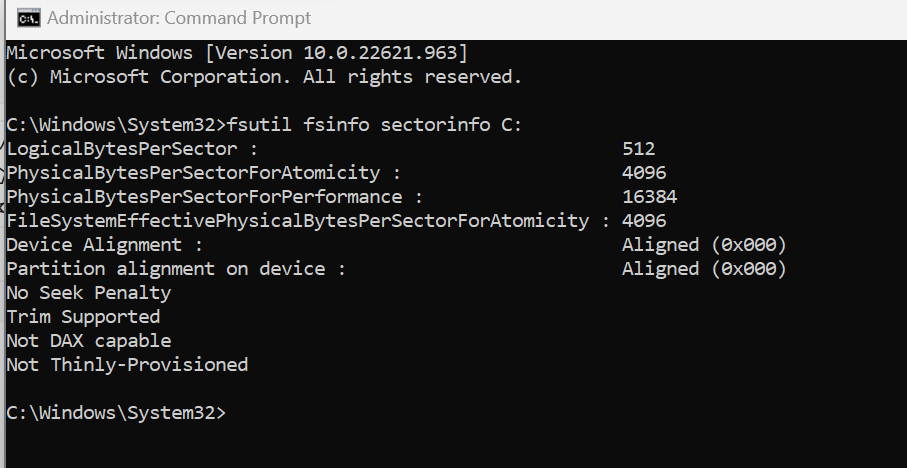
Run this command (in admin mode) to see if the 'PhysicalBytesPerSectorForAtomicity' is <= 4096
fsutil fsinfo sectorinfo C:
If its > 4096 then run this command in PowerShell (in admin mode).
New-ItemProperty -Path "HKLM:\SYSTEM\CurrentControlSet\Services\stornvme\Parameters\Device" -Name "ForcedPhysicalSectorSizeInBytes" -PropertyType MultiString -Force -Value "* 4095"
Restart and try clean install again. Worked for us
Again: start a new question, and don't piggyback on old threads.
And don't forget to include the SQL Server errorlog. (Again see my post above for where to find it.)
' cx='32' cy='32' r='32' /%3E%3Ctext x='50%25' y='55%25' dominant-baseline='middle' text-anchor='middle' fill='%23FFF' %3EDS%3C/text%3E%3C/svg%3E)
I have a (lenovo ideapad gamming 3)amd rayzen and Running in Windows 11 version laptop .When I Install SQL Server But my Data base engine gettting failed its Just Giving
The following error has occurred:
Wait on the Database Engine recovery handle failed. Check the SQL Server error log for potential causes.
Piggybacking on old threads is not a good idea. The recommendation is that you ask a new Question.
However, check the file C:\Program Files\Microsoft SQL Server\MSSQL15.MSSQLSERVER\MSSQL\LOG\ERRORLOG (the exact path depends on your version and edition. This is the path for SQL 2019 Developer Edition.) If this file has a message towards the end baout 256 misaligned reads and synchronous mode, you are running into a known issue, and you should read this troubleshooter from Microsoft.
If you don't see this message, ask a new Question. Be sure attach the ERRORLOG file with the post.
' cx='32' cy='32' r='32' /%3E%3Ctext x='50%25' y='55%25' dominant-baseline='middle' text-anchor='middle' fill='%23FFF' %3ENN%3C/text%3E%3C/svg%3E)
You have an interesting number of reputation points right now, Erland :)
' cx='32' cy='32' r='32' /%3E%3Ctext x='50%25' y='55%25' dominant-baseline='middle' text-anchor='middle' fill='%23FFF' %3EMA%3C/text%3E%3C/svg%3E)
i have the same problem with sql server express 2022, and tried everything but nothing.
pls help
i am using windows 11
You can start by helping yourself by actually reading the messages in this thread. Specifically, read my post above.
' cx='32' cy='32' r='32' /%3E%3Ctext x='50%25' y='55%25' dominant-baseline='middle' text-anchor='middle' fill='%23FFF' %3EJV%3C/text%3E%3C/svg%3E)
Detailed results:
  Feature:                       Database Engine Services
  Status:                        Failed
  Reason for failure:            An error occurred during the setup process of the feature.
  Next Step:                     Use the following information to resolve the error, uninstall this feature, and then run the setup process again.
  Component name:                SQL Server Database Engine Services Instance Features
  Component error code:          0x851A001A
  Error description:             Wait on the Database Engine recovery handle failed. Check the SQL Server error log for potential causes.
if any one know how to resolve this please tell
' cx='32' cy='32' r='32' /%3E%3Ctext x='50%25' y='55%25' dominant-baseline='middle' text-anchor='middle' fill='%23FFF' %3EDP%3C/text%3E%3C/svg%3E)
@Jayant Verma sometime already created instances might trouble to install sql server, make sure all old instances are uninstalled before installation sql…… Goto C:\Program Files\Microsoft SQL Server\MSSQL15.MSSQLSERVER
(uninstall all unnecessary instances) restart computer and try to install it……this might work…
' cx='32' cy='32' r='32' /%3E%3Ctext x='50%25' y='55%25' dominant-baseline='middle' text-anchor='middle' fill='%23FFF' %3EGK%3C/text%3E%3C/svg%3E)
I just tried installing SQL Server 2022 Developer Edition on my Lenovo Thinkpad G2 and got the same error.
Had a similar issue on a new Dell XPS and it ended up being that the drive that the databases were stored on had BitLocker enabled. Turned off Bitlocker for that drive (it was another drive letter besides C:) and the errors went away. Bitlocker for the Lenovo is not turned on and the registry resolution below doesn't work.
' cx='32' cy='32' r='32' /%3E%3Ctext x='50%25' y='55%25' dominant-baseline='middle' text-anchor='middle' fill='%23FFF' %3EVR%3C/text%3E%3C/svg%3E)
I have the same problem with SQL Server Developer 2022 and have tried everything but nothing.
I am using a Lenovo Ideapad Slim 5 Pro Ryzen 5 laptop with Windows 11.
Please help!
' cx='32' cy='32' r='32' /%3E%3Ctext x='50%25' y='55%25' dominant-baseline='middle' text-anchor='middle' fill='%23FFF' %3EDH%3C/text%3E%3C/svg%3E)
' cx='32' cy='32' r='32' /%3E%3Ctext x='50%25' y='55%25' dominant-baseline='middle' text-anchor='middle' fill='%23FFF' %3EFH%3C/text%3E%3C/svg%3E)
Installing SQL Server 2019 Enterprise on my developer laptop has been a nightmare. If a single feature fails to be installed, you are left with something that is very hard to reset.
I have numerous attempts removing and re-installing and everytime a new error. From offline R related features not being able to be downloaded, firewall warnings and now to this recent 'error Wait on the Database Engine Recovery Handle failed' error.
I don't want to go through re-installing my Visual Studio 2022. That is simply not worth the effort, since my developer plugins and customized setup will be reset too.
I am very annoyed about this. The installation wizard has also been the same since back in the 00's. I think it should be time for an updated and more resilient installation experience.
' cx='32' cy='32' r='32' /%3E%3Ctext x='50%25' y='55%25' dominant-baseline='middle' text-anchor='middle' fill='%23FFF' %3EET%3C/text%3E%3C/svg%3E)
I had the same error, and what solved the problem — allowing the installation to complete successfully — was specifying EVERYONE as the user in the Database Engine Configuration step, under the field where you specify the SQL Server authenticator.

You need to look at the SQL Server error log, which should be in C:\Program Files\Microsoft SQL Server\MSSQ15.MSSQLSERVER\MSSQL\LOG\Errorlog (assuming a default installation). The problem is that SQL Server does not start. The errorlog may tell you why.
' cx='32' cy='32' r='32' /%3E%3Ctext x='50%25' y='55%25' dominant-baseline='middle' text-anchor='middle' fill='%23FFF' %3EAA%3C/text%3E%3C/svg%3E)
En el video del siguiente link encontré la solución.
Se debe ejecutar esta línea en CMD ejecutado como Administrador:
REG ADD "HKLM\SYSTEM\CurrentControlSet\Services\stornvme\Parameters\Device" /v "ForcedPhysicalSectorSizeInBytes" /t REG_MULTI_SZ /d "* 4095" /f
Espero les sirva!
Link: https://youtu.be/iv1miBdjCRw
' cx='32' cy='32' r='32' /%3E%3Ctext x='50%25' y='55%25' dominant-baseline='middle' text-anchor='middle' fill='%23FFF' %3ECZ%3C/text%3E%3C/svg%3E)
Hi,
>SQL Server install error Wait on the Database Engine Recovery Handle Failed
The following article details the possible causes and solutions to this problem. Basically, you need to ensure that SQL server is completely cleaned without leaving any residue(including folders and registry), and then always right-click the installation file(setup.exe) and select "run as administrator" to start the installer, and select the startup account of the database engine service as the NT authority \ system (local system account) during installation.
https://www.mssqltips.com/sqlservertip/4526/sql-server-install-error-wait-on-the-database-engine-recovery-handle-failed/
' cx='32' cy='32' r='32' /%3E%3Ctext x='50%25' y='55%25' dominant-baseline='middle' text-anchor='middle' fill='%23FFF' %3EGY%3C/text%3E%3C/svg%3E)
Database Engine as 'NT authority \ system' worked for me. Thanks

We have a developer laptop (Lenovo T14 Gen2) running windows 11 where this error happens, and none of the solutions work.
Try the solutions discussed in this Microsoft article: Troubleshoot errors related to system disk sector size greater than 4 KB. There are known issues with SQL Server on Windows 11 with some storage devices.
' cx='32' cy='32' r='32' /%3E%3Ctext x='50%25' y='55%25' dominant-baseline='middle' text-anchor='middle' fill='%23FFF' %3EIH%3C/text%3E%3C/svg%3E)
Thanks Dan for the link to this. I had the same issue as Anders (even down to the same PC!). The link you sent through helped and after following the steps allowed SQL Express to be installed!
' cx='32' cy='32' r='32' /%3E%3Ctext x='50%25' y='55%25' dominant-baseline='middle' text-anchor='middle' fill='%23FFF' %3EAK%3C/text%3E%3C/svg%3E)
Newer Windows 11 systems tend to have system disk sector size greater than 5Kb ... I'm glad microsoft released this article, was cursing my new laptop for months because of this error. The above article has commands that allow us to change disk sector size reading, which helps.
' cx='32' cy='32' r='32' /%3E%3Ctext x='50%25' y='55%25' dominant-baseline='middle' text-anchor='middle' fill='%23FFF' %3EMM%3C/text%3E%3C/svg%3E)
Make sure you run fsutil fsinfo sectorinfo C:/D:( whatever your drive is) command to see if there is an issue before you add the new key suggested in the Microsoft article, then backup your registry keys(in case errors occur when making a change) with Registry Editor(search "registry editor on Start) if there is a issue and export it first using How to backup and restore specific Registry keys on Windows 11 article as a guide on how to do it.
You'll notice that the file path is "~\Services\stornvme\Parameters\Device" on the Troubleshoot errors related to system disk sector size greater than 4 KB article so just use Registry Editor to navigate to the HKLM (stands for "HKEY_LOCAL_MACHINE") until it matches the file path and export the stornvme or Parameters folder(see article above on how to export backup as a .reg file). Once backed up/saved as a .reg file somewhere, open command prompt run as administrator, copy paste the "REG ADD..." command on command prompt, and RESTART( change won't take effect until you restart) your computer. It should be able to install now. This is what helped me with 1. Adding .mdf file on visual studio 2019 (I was getting errors because disk sector size was greater than 4 KB) and 2. Installing sql server express. Good luck.
' cx='32' cy='32' r='32' /%3E%3Ctext x='50%25' y='55%25' dominant-baseline='middle' text-anchor='middle' fill='%23FFF' %3EGV%3C/text%3E%3C/svg%3E)
This was exactly the root cause of the failure in my case!!! Thank you. I was working on that since yesterday and I was trying to many other alternatives I found before without any success.
Recently I faced the same issue saying database engine recovery failed while installing SQL server 2019 developer version on windows 11
After so many trial and error methods, I was able to install SQL server on windows 11.
' cx='32' cy='32' r='32' /%3E%3Ctext x='50%25' y='55%25' dominant-baseline='middle' text-anchor='middle' fill='%23FFF' %3ERV%3C/text%3E%3C/svg%3E)
@DIVYABHARATHI P The above solution works. Thumps up
' cx='32' cy='32' r='32' /%3E%3Ctext x='50%25' y='55%25' dominant-baseline='middle' text-anchor='middle' fill='%23FFF' %3EGW%3C/text%3E%3C/svg%3E)
I will genuinely cry, thank you so much!!!! After weeks of solution seeking, your steps and emulation of the sector size using registry key made it possible for me to install SQL Server <3
' cx='32' cy='32' r='32' /%3E%3Ctext x='50%25' y='55%25' dominant-baseline='middle' text-anchor='middle' fill='%23FFF' %3EC%3C/text%3E%3C/svg%3E)