Microsoft Security | Microsoft Entra | Microsoft Entra ID
A cloud-based identity and access management service for securing user authentication and resource access

This browser is no longer supported.
Upgrade to Microsoft Edge to take advantage of the latest features, security updates, and technical support.
' cx='32' cy='32' r='32' /%3E%3Ctext x='50%25' y='55%25' dominant-baseline='middle' text-anchor='middle' fill='%23FFF' %3ETA%3C/text%3E%3C/svg%3E)
My Azure account is currently a member of 2 tenants.
I want to remove a tenant that I created with an email address that I no longer have access to, but I am a member of. Or can I be removed from that tenant. Or, can someone reassure me that members of that tenant cannot access my other tenant and bill against my tenant if I am the only user under the tenant?
I feel like I would like to delete everything under Azure and start again as I am nervous about the state of the security.
Thanks,
A cloud-based identity and access management service for securing user authentication and resource access

I wanted to check in and see if you had any other questions or if you were able to resolve this issue?
If you have any other questions, please let me know. Thank you for your time and patience throughout this issue.
If the information helped address your question, please Accept the answer. This will help us and also improve searchability for others in the community who might be researching similar information.
Hi James. No. I wasn't able to resolve this, and I have had no replies to my question. How do I remove the tenant that I do not have access to?
' cx='32' cy='32' r='32' /%3E%3Ctext x='50%25' y='55%25' dominant-baseline='middle' text-anchor='middle' fill='%23FFF' %3ESG%3C/text%3E%3C/svg%3E)
If you have access to 2 different tenants that means your account is provisioned in both the tenants.
Now, if you want to remove your account from one of the tenants, then Global admin of tenant can remove your account. Or you can also leave the directory.
When it comes to leaving your second "Default Directory", you should be able to do this through the Azure Portal or your My Account page. For more info - Leave an organization as an external user.
Note: You can usually leave an organization on your own without having to contact an administrator. However, in some cases this option won't be available and you'll need to contact your tenant admin, who can delete your account in the external organization.
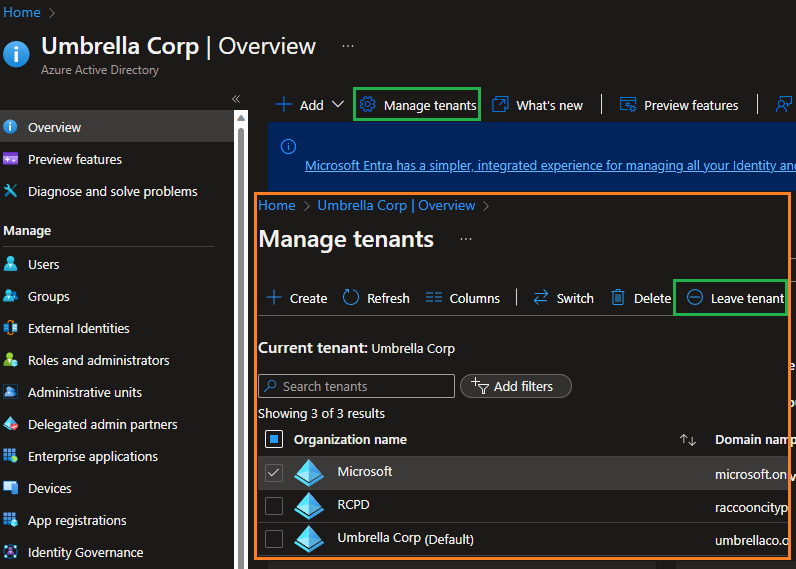
Azure Portal:
Within the Azure Portal navigate to your Azure Active Directory
Select Manage Tenants
Select the Tenant you want to leave and select Leave tenant
My Account page - How to leave an organization
To view the organizations you belong to, first open your My Account page. You either have a work or school account created by an organization or a personal account such as for Xbox, Hotmail, or Outlook.com.
If you're using a work or school account, go to https://myaccount.microsoft.com and sign in.
If you're using a personal account or email one-time passcode, you'll need to use a My Account URL that includes your tenant name or tenant ID, for example: https://myaccount.microsoft.com?tenantId=wingtiptoys.onmicrosoft.com or https://myaccount.microsoft.com?tenantId=ab123456-cd12-ef12-gh12-ijk123456789.
Select Organizations from the left navigation pane or select the Manage organizations link from the Organizations block.
Under Other organizations you collaborate with (or Organizations if you don't have a home organization), find the organization that you want to leave, and then select Leave.
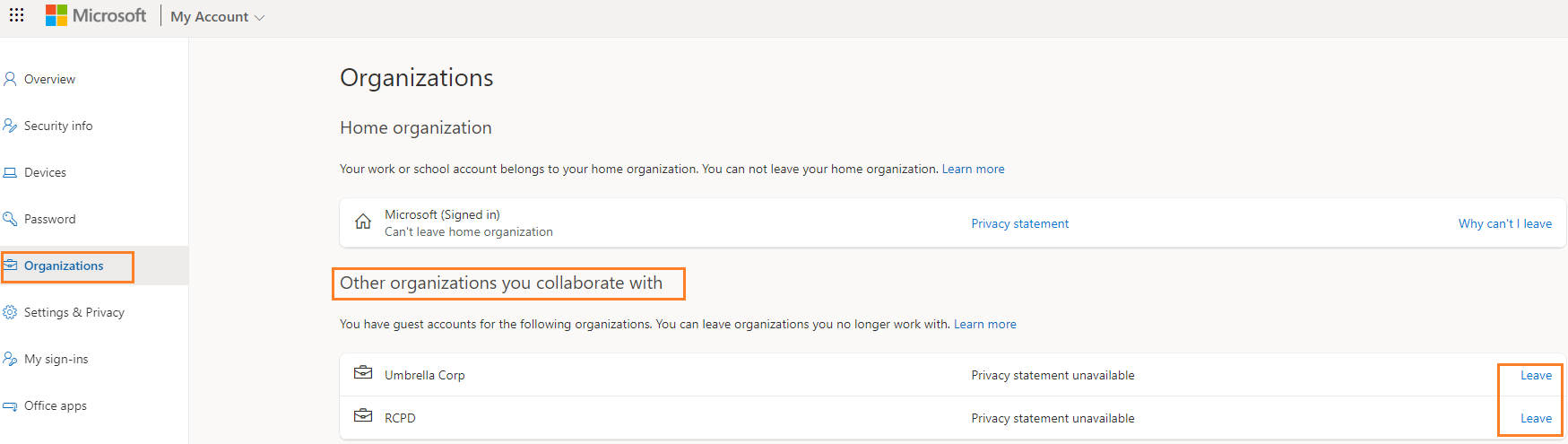
Note: In the Home organization section, there's no link to Leave your organization. Only an administrator can remove your account from your home organization.
Additional Links:
Manage organizations for a work or school account in the My Account portal
Why can’t I leave an organization?
Let me know if you have any further questions.
Please "Accept the answer" if the information helped you. This will help us and others in the community as well.
' cx='32' cy='32' r='32' /%3E%3Ctext x='50%25' y='55%25' dominant-baseline='middle' text-anchor='middle' fill='%23FFF' %3ERS%3C/text%3E%3C/svg%3E)
What happens if the tentant (directory) no longer exists? Our organization killed their MSFT account 10 years ago but my personal account is still linked. This prevents me from logging into azure because it tries to use a deleted tenant and boots me out... it started once they did the MFA stuff that it was really problematic. All of the solutions do not deal with personal accounts. Nor do they seem to cover cases like this where the tenant in theory should no longer exist.
This comment has been deleted due to a violation of our Code of Conduct. The comment was manually reported or identified through automated detection before action was taken. Please refer to our Code of Conduct for more information.