Microsoft Security | Microsoft Entra | Microsoft Entra ID
A cloud-based identity and access management service for securing user authentication and resource access

This browser is no longer supported.
Upgrade to Microsoft Edge to take advantage of the latest features, security updates, and technical support.
' cx='32' cy='32' r='32' /%3E%3Ctext x='50%25' y='55%25' dominant-baseline='middle' text-anchor='middle' fill='%23FFF' %3EBT%3C/text%3E%3C/svg%3E)
Hello all,
In O365 admin center, when I went to display "Exchange Active Sync" in Azure Sign-in logs, I was able to find a useful field called "User Agent" (in Basic info tab) like below.
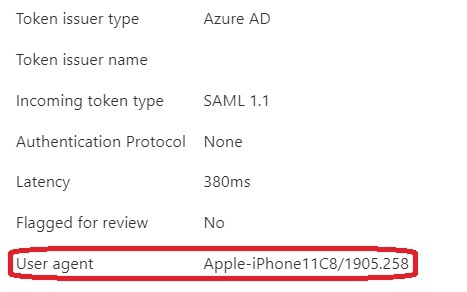
However, when I used Powershell cmdlet Get-AzureADAuditSignInLogs to dump the log out, there is no such field.
There is only a DeviceDetail field like below.
Can someone please verify for me?
DeviceDetail                     : class SignInAuditLogObjectDeviceDetail {
                                     DeviceId: daa00f9d-12e7-4684-a8b8-25bced93a663
                                     DisplayName: Mick’s phone
                                     OperatingSystem: Ios
                                     Browser: Mobile Safari
                                     IsCompliant: True
                                     IsManaged: True
                                     TrustType: Azure AD registered
                                   }
A cloud-based identity and access management service for securing user authentication and resource access
This answer has been deleted due to a violation of our Code of Conduct. The answer was manually reported or identified through automated detection before action was taken. Please refer to our Code of Conduct for more information.
5 deleted commentsComments have been turned off. Learn more

The Azure AD module is a bit outdated, best use the MS Graph SDK, or call the Graph API https://graph.microsoft.com/beta/auditLogs/signIns endpoint directly - you will see the User agent string therein.
Thanks michev.
Good to meet you here and I always enjoyed your blog.