Jeg får ikke pop-up vinduet "påmindelser" i min kalender

Anonym
2024-09-30T12:15:53+00:00

Hej,

Jeg har problemer med, at jeg ikke får påmindelser i den lille pop-up boks, 15 minutter inden mit møde starter.

Nogen der kan hjælpe?

Låst spørgsmål. Dette spørgsmål blev migreret fra Microsoft Support-community'et. Du kan stemme om, hvorvidt det er nyttigt, men du kan ikke tilføje kommentarer eller svar eller følge spørgsmålet.

0 kommentarer Ingen kommentarer

9 svar

Sortér efter: Nyeste
  1. Anonym
    2024-10-04T14:51:14+00:00

    Hello Cecilie Orris Eriksen,

    Thank you for your prompt reply. Due to data privacy concerns, I have requested a log in a private message. Please check the private message at your earliest convenience.

    Thank you in advance for your understanding. Your patience and cooperation are greatly appreciated.

    I wish you all the best.

    Sincerely  

    Feroz Mahmud | Microsoft Community Moderator

    Var dette svar nyttigt?

    0 kommentarer Ingen kommentarer
  2. Anonym
    2024-10-04T07:44:37+00:00

    Hello

    I have tried to repair the app and in addition I have attached the picture in relation to which version I use.

    Var dette svar nyttigt?

    0 kommentarer Ingen kommentarer
  3. Anonym
    2024-10-03T16:43:04+00:00

    Hello Cecilie Orris Eriksen,

    Thank you for your prompt reply. You’ve only provided the business email address. To help us better understand the issue and assist you effectively, we kindly request some additional information:

    • Have you attempted to repair the Office application? If not, please follow the steps below: Microsoft Office Repair:
      • Open Settings by clicking on the Start menu and selecting the gear icon.
      • Choose Apps from the options and then select Installed Apps.
      • Scroll down the list of apps and find Microsoft Office.
      • Click on Microsoft Office, then select Advanced options.
      • Choose Repair or Online Repair.
      • Once the repair process is complete, restart your computer to ensure the changes take effect.
    • Which version of Outlook are you currently using where you are facing this issue? To provide the details of your Outlook version and product information:
      • For New Outlook: Go to Settings > General > About Outlook.
      • For Classic Outlook: Navigate to File > Office Account.
        Please take a screenshot of the entire page and share it with us.
        For your reference: What version of Outlook do I have?

    Providing this information will help us to gain a better understanding of the issue.

    If you share the information requested above, it will help us for future consultation.

    Please note that my initial response may not resolve your current situation immediately. However, with your help and more detailed information, we can work together to find a particular direction of your current situation.

    Note: Due to forum policy and to protect sensitive information, please share with me above some requested screenshot information in "View Private messages".

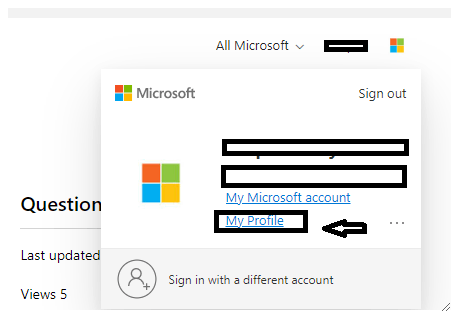
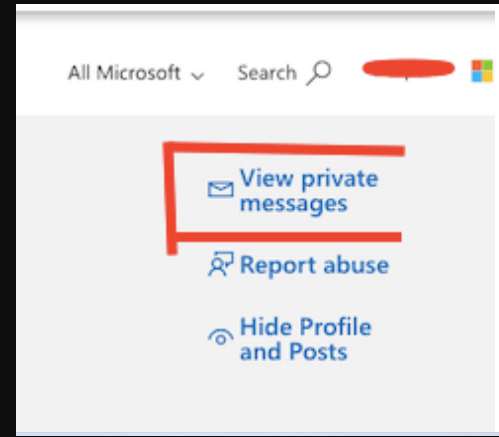
    Here are the steps to open "View private messages":

    To view private messaging options> Sign in to Microsoft Community, use the email account where you posted this thread information to Microsoft Community, > click your profile picture in the top right, > select the My Profile option.
    ImageImage

    I will look forward to your next update on this in a private message. I will provide you further guidance accordingly.

    Sincerely

    Feroz Mahmud | Microsoft Community Moderator

    Var dette svar nyttigt?

    0 kommentarer Ingen kommentarer
  4. Anonym
    2024-10-02T13:57:18+00:00

    I use this account: *** The email address was removed for privacy purposes *** and it's a work email.

    Var dette svar nyttigt?

    0 kommentarer Ingen kommentarer
  5. Anonym
    2024-10-02T12:14:11+00:00

    Hello Cecilie Orris Eriksen,

    Good day! Thank you for your prompt reply.

    Before moving forward, could you allow me to gather information below to narrow down your specific scenario?

    • Could you please share the affected User Principal Name (UPN), which is the email address associated with the issue? Please provide details regarding your specific Office 365 subscription. Are you using Microsoft 365 Business Basic, Standard, Enterprise, or Education? Alternatively, is it Microsoft 365 Family, Personal, Office 365 Home and Business, Office 365 Home and Student, or a Personal Outlook.com subscription?
    • If you are using any other third-party account or hosting service, could you please confirm where the mailbox is hosted and whether you are using SMTP, POP, or IMAP for sending and receiving emails?
    • Would you mind providing the entire screenshot that shows the Subscription you are using? To check this, please log in to My Account (office.com) -->Subscription
    • Have you tried updating or repairing the Outlook application?
    • Which version of Outlook are you currently using where you are facing this issue? To provide the details of your Outlook version and product information:
      • For New Outlook: Go to Settings > General > About Outlook.
      • For Classic Outlook: Navigate to File > Office Account.
        Please take a screenshot of the entire page and share it with us.
        For your reference: What version of Outlook do I have?
    • If you are experiencing any error messages, could you share a screenshot of the full error message? It would be even more helpful if you could record the setup process, which would allow me to understand precisely what you are experiencing. You can find instructions on how to record your screen in PowerPoint here: Optag din skærm i PowerPoint 2013 - Microsoft Support

    Providing this information will help us to gain a better understanding of the issue.

    If you share the information requested above, it will help us for future consultation.

    Please note that my initial response may not resolve your current situation immediately. However, with your help and more detailed information, we can work together to find a particular direction of your current situation.

    Note: Due to forum policy and to protect sensitive information, please share with me above some requested screenshot information in "View Private messages".

    Here are the steps to open "View private messages":

    To view private messaging options> Sign in to Microsoft Community, use the email account where you posted this thread information to Microsoft Community, > click your profile picture in the top right, > select the My Profile option.

    ImageImage

    I will look forward to your next update on this in a private message. I will provide you further guidance accordingly.

    Sincerely

    Feroz Mahmud | Microsoft Community Moderator

    Var dette svar nyttigt?

    0 kommentarer Ingen kommentarer