Why does my Windows Laptop shut down when i unplug it from its charger?

Carlisle A 20 Reputation points
2026-01-24T01:01:15.8266667+00:00

Greeting here!

I have a Windows 11 Vivobook S15 that I bought in 2020, and for the past week or 2, it just can't turn on if it's not connected with the charger. If my laptop is on and connected, it instantly shuts down whenever I unplug it. Also, the battery percentage stays the same even though it says that it's charging, the percentage can even decrease sometimes! Which is why i decided to research about why my laptop was doing this. ( FYI, my laptop doesn't have any other problems )

I came across an answered question in the Microsoft QNA of someone that has the exact same problem as me, so i read and followed the instructions that the person at Microsoft answered with. After following the Instructions, i got a battery report including the capacity of my battery: Screenshot 2026-01-23 124205
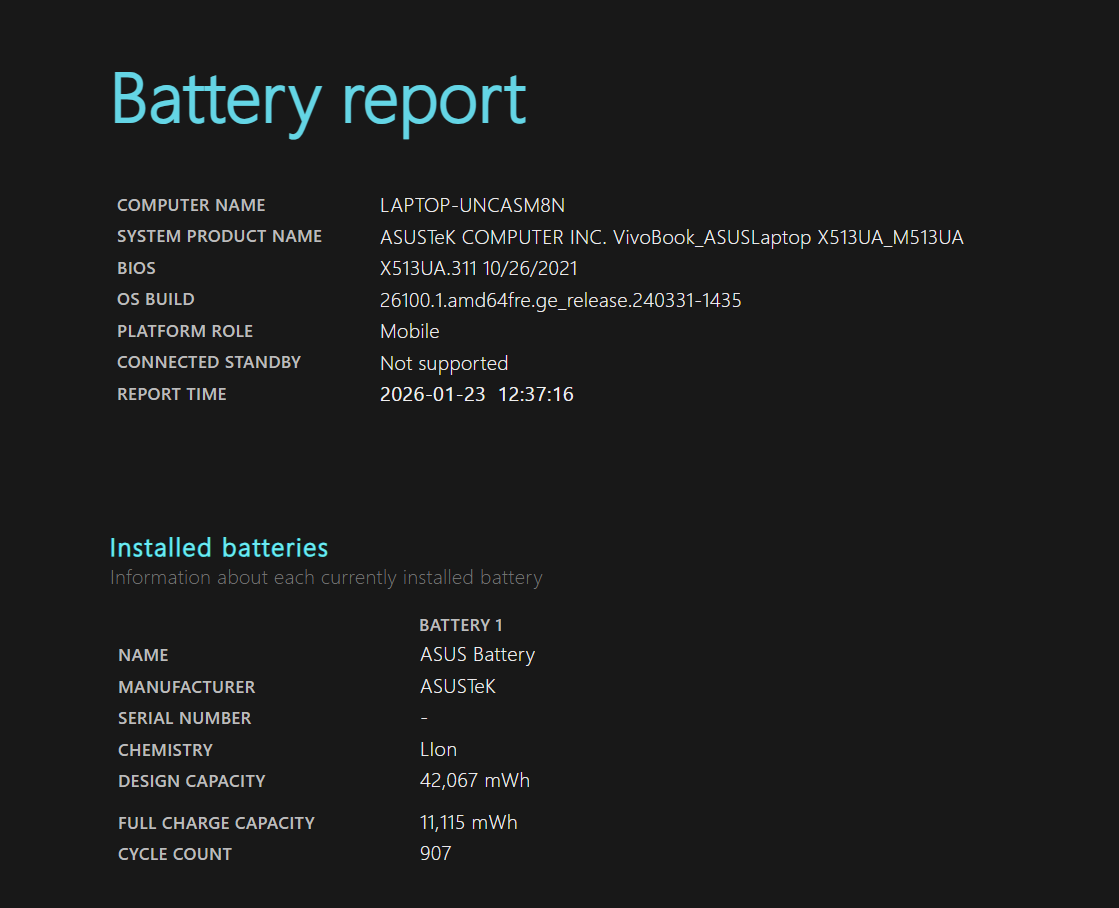
It seems to be that the full charge capacity is about 1/4ths of what it's supposed to be, and I'm not too sure what to do with the information, should i replace my batteries? should i not?

Please reach out to me if you know what i should do.

Thanks alot in advance.

Windows for home | Windows 11 | Performance and system failures
0 comments No comments

Answer accepted by question author
EmilyS726 284.1K Reputation points Independent Advisor
2026-01-24T01:39:43.7933333+00:00

From what you described, this is almost always a battery that has failed. And your battery report detail is quite clear: if the Full charge capacity is only around 1/4 of the Design capacity, the pack is heavily degraded. So the behavior is normal.

Replace the battery. That’s the practical fix.

Was this answer helpful?

3 people found this answer helpful.
0 comments No comments

2 additional answers

Sort by: Most helpful
  1. AI answer

    2026-01-24T01:01:27.7333333+00:00

    It sounds like your laptop's battery may be failing or has significantly degraded, which is causing it to shut down immediately when unplugged from the charger. Here are a few points to consider:

    1. Battery Health: The fact that your laptop shuts down when unplugged and the battery percentage does not change (or decreases) suggests that the battery is not holding a charge properly. This is often a sign of battery wear or failure.
    2. Battery Capacity: If your battery report indicates that the full charge capacity is significantly lower than expected (about 1/4 of what it should be), it is likely that the battery is unable to provide sufficient power to keep the laptop running without being plugged in.
    3. Replacement: Given these symptoms, it may be necessary to replace the battery. A degraded battery can lead to performance issues and can also affect other components if not addressed.
    4. Troubleshooting: Before replacing the battery, you could try updating your laptop's BIOS and checking for any power management settings that might affect battery performance. However, if the battery is indeed failing, replacement is likely the best solution.

    If you decide to replace the battery, ensure you get a compatible battery for your specific laptop model.


    References:

    AI-generated content may be incorrect. Read our transparency notes for more information.

    Was this answer helpful?

    2 people found this answer helpful.
  2. 翔宸 侯 5 Reputation points
    2026-01-24T02:37:04.4033333+00:00

    Please take the battery out if you can, a battery reaching the end of it's life is dangerous

    Was this answer helpful?

    1 person found this answer helpful.
    0 comments No comments

Your answer

Answers can be marked as 'Accepted' by the question author and 'Recommended' by moderators, which helps users know the answer solved the author's problem.