Well, I learned something today.
Your one image pointed to something called "Intel(R) Management Engine Interface #1". I checked my laptop and found that I am running version 2433.6.3.0.
Get-WmiObject Win32_PnPSignedDriver | sort-object -Property devicename | Select-Object DeviceName, DriverVersion, Manufacturer
I searched the Intel site and found that version 2514.7.16.0 dated 4/29/2025 is available.
https://www.intel.com/content/www/us/en/download/682431/intel-management-engine-drivers-for-windows-10-and-windows-11.html
This page documents that not all Intel products are updated through the Support Assistant tool.
https://www.intel.com/content/www/us/en/support/articles/000032252/software/software-applications.html
Then I found this which indicates "This download record contains a tool to determine if a system is impacted by recent Intel security advisories."
https://www.intel.com/content/www/us/en/download/19392/intel-converged-security-and-management-engine-version-detection-tool-intel-csmevdt.html
Running it indicates that my system is vulnerable.
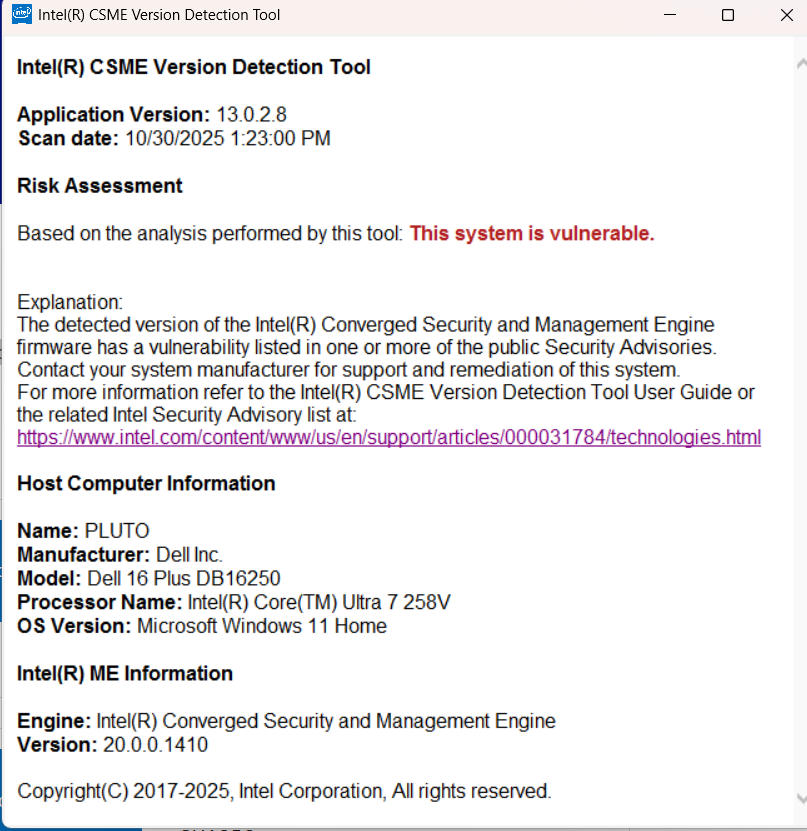
Based on what I found, it would appear that the AVG software does offer some value since it is detecting vulnerabilities that other tools do not.
For my pc, I am now torn between the "if it ain't broke, don't fix it" philosophy and "maybe I should investigate this to understand if the vulnerability really applies to me".
It sure would be nice if the Intel Support Assistant detected and updated this.
' cx='32' cy='32' r='32' /%3E%3Ctext x='50%25' y='55%25' dominant-baseline='middle' text-anchor='middle' fill='%23FFF' %3ELC%3C/text%3E%3C/svg%3E)


